> ## Documentation Index
> Fetch the complete documentation index at: https://prismeai-legacy.mintlify.site/llms.txt
> Use this file to discover all available pages before exploring further.

# Overview

> Discover AI Knowledge, the product for connecting AI to the expertise and information of your organization

AI Knowledge enables organizations to create AI agents that leverage their unique expertise, documents, and information. Using Retrieval Augmented Generation (RAG), AI Knowledge connects language models to your specific knowledge, allowing them to provide accurate, contextual responses based on your organization's content.

## Key Features

<CardGroup cols={2}>
  <Card title="Knowledge Base Creation" icon="database">
    Build searchable repositories of your organization's information
  </Card>

  <Card title="Document Management" icon="file-lines">
    Upload, process, and organize documents across formats
  </Card>

  <Card title="RAG Configuration" icon="sliders">
    Fine-tune how AI accesses and uses your knowledge
  </Card>

  <Card title="Agent Creation" icon="robot">
    Build specialized agents powered by your knowledge
  </Card>

  <Card title="Testing & Validation" icon="vial">
    Verify accuracy and relevance of responses
  </Card>

  <Card title="Tool Integration" icon="screwdriver-wrench">
    Extend capabilities with specialized tools
  </Card>

  <Card title="Performance Analytics" icon="chart-line">
    Track knowledge retrieval effectiveness
  </Card>

  <Card title="Continuous Improvement" icon="arrows-rotate">
    Refine and optimize knowledge access over time
  </Card>
</CardGroup>

<Frame>
  <iframe width="560" height="315" src="https://www.loom.com/embed/5bd920381cf14af98b1dce1541043920?sid=0204d7cb-6c05-4669-ac72-4b249b49fade" title="Introduction to AI Knowledge" frameBorder="0" allow="accelerometer; autoplay; clipboard-write; encrypted-media; gyroscope; picture-in-picture" allowFullScreen />
</Frame>

## Who Uses AI Knowledge?

AI Knowledge serves various roles within organizations:

<Tabs>
  <Tab title="Knowledge Managers">
    Information specialists and knowledge managers use AI Knowledge to:

    * Organize and structure organizational knowledge
    * Create accessible knowledge bases
    * Maintain and update information
    * Monitor knowledge usage and gaps
  </Tab>

  <Tab title="Subject Matter Experts">
    Domain experts use AI Knowledge to:

    * Capture and share specialized expertise
    * Build agents that reflect their knowledge
    * Answer common questions in their field
    * Scale their impact across the organization
  </Tab>

  <Tab title="Business Teams">
    Functional departments use AI Knowledge to:

    * Create specialized agents for their domain
    * Provide consistent information to stakeholders
    * Reduce repetitive questions and inquiries
    * Preserve institutional knowledge
  </Tab>

  <Tab title="IT & Developers">
    Technical teams use AI Knowledge to:

    * Configure and optimize knowledge retrieval
    * Integrate knowledge agents with existing systems
    * Build custom tools and extensions
    * Implement advanced RAG architectures
  </Tab>
</Tabs>

## How AI Knowledge Works

<Frame>
  <iframe width="560" height="315" src="https://www.loom.com/embed/f67ecbb9f1164b54810a1b813979150f?sid=03336e80-1365-4cb8-85d7-fc55dda6e61b" title="Introduction to AI Knowledge" frameBorder="0" allow="accelerometer; autoplay; clipboard-write; encrypted-media; gyroscope; picture-in-picture" allowFullScreen />
</Frame>

<Steps>
  <Step title="Document Ingestion">
    Upload and process your organization's documents and content.

    AI Knowledge supports various document types including:

    * PDF files
    * Word documents
    * PowerPoint presentations
    * Excel spreadsheets
    * HTML content
    * Text files
    * Images with text (via OCR)
    * And more
  </Step>

  <Step title="Knowledge Processing">
    Documents are processed, chunked, and converted into embeddings.

    Processing includes:

    * Text extraction
    * Semantic chunking
    * Vector embedding generation
    * Metadata extraction
    * Optional content enrichment
  </Step>

  <Step title="Knowledge Base Creation">
    Organize and structure processed documents into searchable knowledge bases.

    Knowledge bases can be:

    * Topic-specific
    * Department-focused
    * Project-based
    * Product-centered
    * Audience-targeted
  </Step>

  <Step title="Agent Configuration">
    Connect knowledge bases to AI agents and fine-tune retrieval settings.

    Configuration includes:

    * RAG parameters
    * Context handling
    * Query processing
    * Response generation
    * Tool integration
  </Step>

  <Step title="Deployment & Use">
    Make knowledge-powered agents available to users through various channels.

    Deployment options:

    * AI Store listing
    * Direct sharing
    * Integration into applications
    * API access
    * Embedded experiences
  </Step>

  <Step title="Monitoring & Optimization">
    Track performance and continuously improve knowledge retrieval.

    Key metrics include:

    * Retrieval accuracy
    * Query coverage
    * User satisfaction
    * Knowledge gaps
    * Response quality
  </Step>
</Steps>

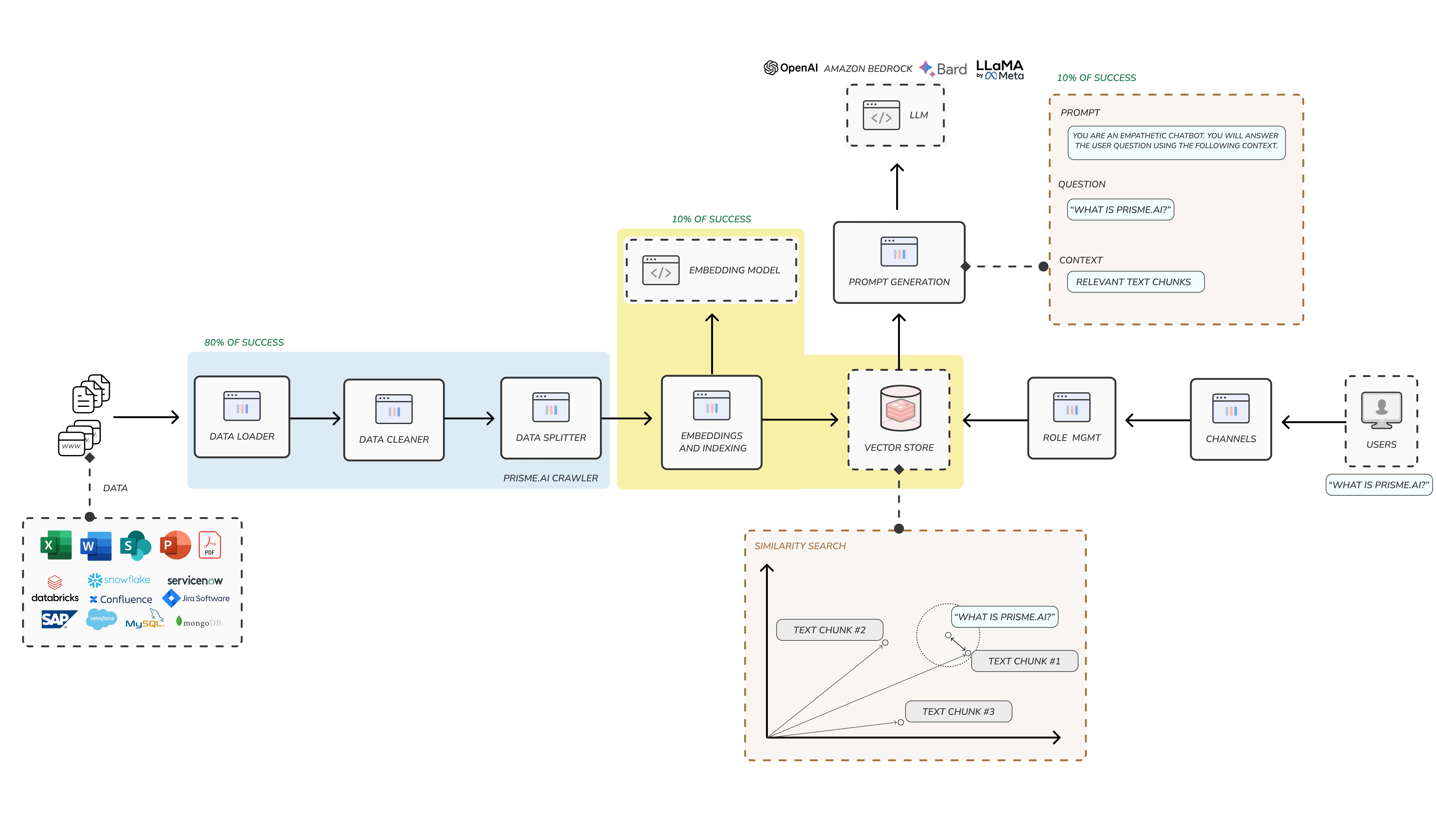
## RAG Overview

<Frame>
  <img src="https://mintcdn.com/prismeai-legacy/jdOgS9ouJy0zTcFo/images/rag-architecture.png?fit=max&auto=format&n=jdOgS9ouJy0zTcFo&q=85&s=e9b152ea7261977aa3f429fb93794de9" alt="RAG Overview" width="9220" height="5396" data-path="images/rag-architecture.png" />
</Frame>

Retrieval Augmented Generation (RAG) is the core technology behind AI Knowledge:

<Accordion title="What is RAG?">
  RAG combines retrieval systems with generative AI to produce responses grounded in specific knowledge:

  1. A user query is processed to understand the information need
  2. Relevant documents or passages are retrieved from knowledge bases
  3. Retrieved information is provided as context to the language model
  4. The model generates a response that incorporates this specific knowledge

  This approach ensures AI responses are:

  * Grounded in accurate, up-to-date information
  * Specific to your organization's context
  * Properly attributed to sources
  * Less prone to hallucination or fabrication
</Accordion>

<Accordion title="Benefits of RAG">
  Using RAG through AI Knowledge provides several advantages:

  * **Knowledge Recency**: Access the latest information, beyond the model's training cutoff
  * **Factual Grounding**: Base responses on verified organizational knowledge
  * **Reduced Hallucinations**: Minimize fabricated or incorrect information
  * **Domain Specificity**: Provide expertise in your organization's unique areas
  * **Source Attribution**: Trace responses back to specific documents and sources
  * **Knowledge Control**: Determine exactly what information the AI can access and use
  * **Compliance Support**: Ensure responses adhere to organizational policies and standards
</Accordion>

## Knowledge Base Types

AI Knowledge supports different types of knowledge bases to meet various needs:

<CardGroup cols={2}>
  <Card title="Document Repositories" icon="folder-open">
    Collections of structured documents like manuals, reports, and policies
  </Card>

  <Card title="FAQ Collections" icon="circle-question">
    Frequently asked questions with curated answers
  </Card>

  <Card title="Product Knowledge" icon="box">
    Information about products, specifications, and features
  </Card>

  <Card title="Procedural Guides" icon="list-check">
    Step-by-step instructions and processes
  </Card>

  <Card title="Technical Documentation" icon="file-code">
    Technical details, APIs, and system information
  </Card>

  <Card title="Training Materials" icon="graduation-cap">
    Educational content and learning resources
  </Card>

  <Card title="Research Collections" icon="microscope">
    Scientific papers, studies, and findings
  </Card>

  <Card title="Legal & Compliance" icon="scale-balanced">
    Regulations, policies, and compliance information
  </Card>
</CardGroup>

## Integration with Prisme.ai Products

AI Knowledge works seamlessly with other Prisme.ai products:

<table>
  <thead>
    <tr>
      <th>Product</th>

      <th>Integration</th>
    </tr>
  </thead>

  <tbody>
    <tr>
      <td>AI SecureChat</td>

      <td>Access knowledge bases through conversational interface</td>
    </tr>

    <tr>
      <td>AI Store</td>

      <td>Share and discover knowledge-powered agents</td>
    </tr>

    <tr>
      <td>AI Collection</td>

      <td>Combine structured and unstructured data access</td>
    </tr>

    <tr>
      <td>AI Builder</td>

      <td>Create advanced applications with knowledge integration</td>
    </tr>

    <tr>
      <td>AI Governance</td>

      <td>Manage access and security for knowledge resources</td>
    </tr>

    <tr>
      <td>AI Insights</td>

      <td>Track performance of knowledge-based interactions</td>
    </tr>
  </tbody>
</table>

## Getting Started with AI Knowledge

<Steps>
  <Step title="Access AI Knowledge">
    Navigate to AI Knowledge from your Prisme.ai dashboard.
  </Step>

  <Step title="Create your first knowledge base">
    Click "Create Knowledge Base" to begin the setup process.

    Follow the guided process to:

    * Name your knowledge base
    * Define its purpose
    * Set access permissions
    * Configure basic settings
  </Step>

  <Step title="Upload initial documents">
    Add documents to your knowledge base.

    You can:

    * Upload files directly
    * Connect to document repositories
    * Import from URLs
    * Use the document processing API
  </Step>

  <Step title="Configure basic RAG settings">
    Set up how your knowledge will be processed and retrieved.
    Start with recommended settings for:

    * Chunking strategy
    * Retrieval method
    * Context handling
    * Response generation
  </Step>

  <Step title="Create a knowledge agent">
    Build an agent that uses your knowledge base.

    Define:

    * Agent purpose and behavior
    * Knowledge base connections
    * Response preferences
    * User interaction style
  </Step>

  <Step title="Test and refine">
    Try out your agent and adjust settings as needed.

    The testing interface allows you to:

    * Ask sample questions
    * View retrieved contexts
    * Evaluate response quality
    * Identify areas for improvement
  </Step>
</Steps>

## Use Cases

<CardGroup cols={2}>
  <Card title="Internal Knowledge Management" icon="building">
    <p>Create agents that help employees find and use company policies, procedures, and best practices.</p>

    <p>
      Example:

      HR Policy Assistant that answers questions about benefits, time off, and workplace policies.
    </p>
  </Card>

  <Card title="Technical Support" icon="headset">
    <p>
      Build agents that assist with troubleshooting, maintenance, and technical information.
    </p>

    <p>
      Example:

      Product Support Agent that helps customers resolve issues with specific products.
    </p>
  </Card>

  <Card title="Research Assistance" icon="magnifying-glass-chart">
    <p>
      Develop agents that help analyze and extract insights from research collections.
    </p>

    <p>
      Example:

      Research Assistant that helps scientists navigate relevant papers and studies.
    </p>
  </Card>

  <Card title="Training & Onboarding" icon="user-graduate">
    <p>
      Create agents that help with learning and skill development.
    </p>

    <p>
      Example:

      Onboarding Assistant that guides new employees through company systems and processes.
    </p>
  </Card>

  <Card title="Sales & Marketing Support" icon="bullhorn">
    <p>
      Build agents that provide accurate product information and marketing content.
    </p>

    <p>
      Example:

      Product Knowledge Agent that helps sales teams access accurate specifications and features.
    </p>
  </Card>

  <Card title="Compliance & Legal" icon="gavel">
    <p>
      Develop agents that help navigate complex regulatory and legal requirements.
    </p>

    <p>
      Example:

      Compliance Assistant that provides guidance on industry regulations and internal policies.
    </p>
  </Card>
</CardGroup>

## Next Steps

Explore more detailed guides for AI Knowledge features:

<CardGroup cols={3}>
  <Card title="Knowledge Bases" icon="database" href="knowledge-bases">
    Create and manage collections of organizational knowledge
  </Card>

  <Card title="Document Management" icon="file-lines" href="document-management">
    Upload, process, and organize documents
  </Card>

  <Card title="Create Knowledge Base" icon="square-plus" href="create-knowledge-base">
    Step-by-step guide to building your first knowledge base
  </Card>

  <Card title="RAG Configuration" icon="sliders" href="rag-configuration">
    Fine-tune retrieval and response settings
  </Card>

  <Card title="Analytics" icon="chart-line" href="analytics">
    Track and improve knowledge base performance
  </Card>

  <Card title="Tools Integration" icon="screwdriver-wrench" href="tools-integration">
    Enhance agents with specialized capabilities
  </Card>

  <Card title="Agent Testing" icon="vial" href="agent-testing">
    Validate and improve agent responses
  </Card>

  <Card title="Advanced RAG" icon="wand-sparkles" href="advanced-rag">
    Implement sophisticated RAG architectures
  </Card>
</CardGroup>
