> ## Documentation Index
> Fetch the complete documentation index at: https://prismeai-legacy.mintlify.site/llms.txt
> Use this file to discover all available pages before exploring further.
# Overview
> Discover AI Governance, the enterprise platform for monitoring and managing your AI ecosystem
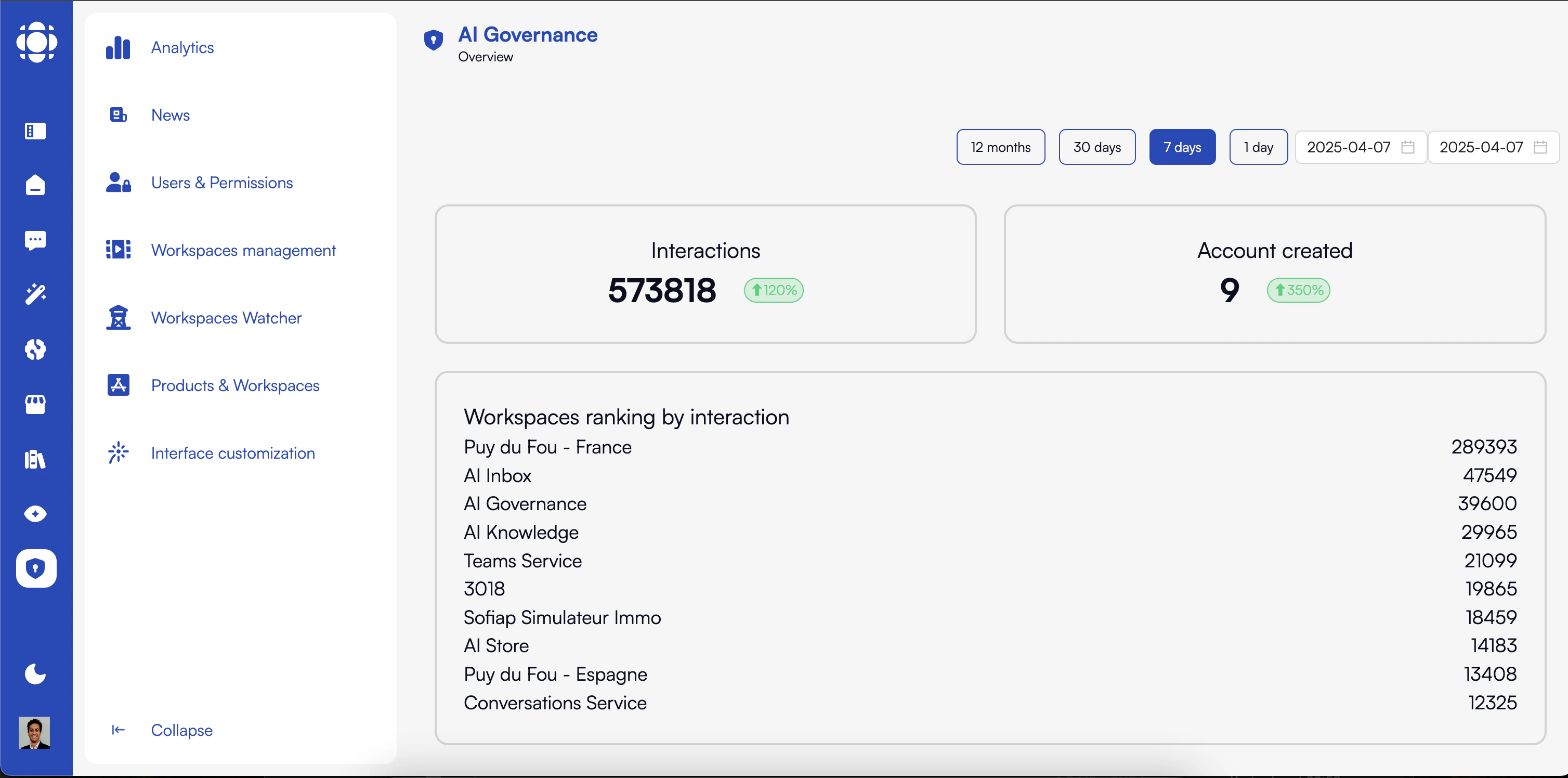 AI Governance is Prisme.ai's enterprise-grade platform for monitoring, managing, and securing your entire AI ecosystem. It provides comprehensive visibility across all workspaces, users, and activities, enabling organizations to implement effective governance policies while optimizing resource utilization and ensuring compliance.
## Key Features
Track usage, performance, and costs across all AI products and workspaces
Manage permissions, roles, and access controls for all users
Create, monitor, and control AI workspaces across the organization
Detailed visibility into interactions and performance of each workspace
Administer all Prisme.ai products from a single dashboard
Customize platform appearance, languages, and global settings
Create and distribute announcements to all platform users
Track API interactions and performance across the platform
## Who Uses AI Governance?
AI Governance is designed for teams responsible for managing, securing, and optimizing AI operations across the organization.
IT administrators use AI Governance to:
* Manage user access and permissions
* Monitor system performance and usage
* Configure platform settings and integrations
* Implement security policies and controls
Compliance teams use AI Governance to:
* Monitor AI usage for regulatory compliance
* Implement governance frameworks and policies
* Track sensitive data access and usage
* Generate audit reports and documentation
AI operations teams use AI Governance to:
* Track resource utilization and performance
* Monitor costs and optimize usage
* Identify usage patterns and bottlenecks
* Manage workspaces and deployments
Business leaders use AI Governance to:
* Get visibility into AI adoption and value
* Monitor costs and return on investment
* Ensure alignment with business objectives
* Identify opportunities for AI expansion
## Core Capabilities
### Platform Analytics
Gain comprehensive visibility into your AI ecosystem with detailed analytics:
* **Usage Metrics**: Track interactions, users, and activity patterns
* **Performance Monitoring**: Measure response times and system efficiency
* **Cost Tracking**: Monitor resource consumption and associated costs
* **Trend Analysis**: Identify patterns and changes over time
* **Workspace Ranking**: See which workspaces have the highest usage
### User and Permission Management
Implement robust access controls and user management:
* **User Administration**: Create, edit, and manage user accounts
* **Role-Based Access Control**: Define and assign roles with specific permissions
* **Group Management**: Organize users into functional groups
* **Authentication Controls**: Implement secure login policies
* **Activity Monitoring**: Track user actions for security and compliance
### Workspace Management
Effectively manage and control all AI workspaces:
* **Workspace Creation**: Create and configure new AI workspaces
* **Resource Allocation**: Assign computing resources and set limits
* **Usage Monitoring**: Track workspace activity and performance
* **Template Management**: Create and apply workspace templates
* **Lifecycle Management**: Control workspace activation and deactivation
### Workspace Observability
Gain deep insights into workspace activities and performance:
* **Interaction Tracking**: Monitor events, API calls, and user interactions
* **Performance Metrics**: Track execution times and resource utilization
* **Automation Monitoring**: Observe automated processes and workflows
* **Graphical Analysis**: Visualize workflows and interaction paths
* **Anomaly Detection**: Identify unusual patterns or potential issues
### Product and Template Management
Administer all Prisme.ai products from a single interface:
* **Product Configuration**: Manage settings for all Prisme.ai products
* **Integration Control**: Configure connections between products
* **Template Administration**: Create and manage templates across products
* **Deployment Management**: Control product deployments and updates
* **Feature Enablement**: Activate and deactivate product features
## Integration with Other Prisme.ai Products
AI Governance works seamlessly with all other Prisme.ai products:
* **AI Knowledge**: Monitor agent usage, performance, and costs
* **AI SecureChat**: Track conversations and resource utilization
* **AI Collection**: Observe data processing and analysis activities
* **AI Insights**: Integrate governance controls with conversation analysis
* **AI Store**: Manage agent deployments and utilization
## Getting Started with AI Governance
Log in with administrator credentials to access the AI Governance dashboard.
Begin by exploring the Analytics dashboard to understand your current AI ecosystem.
Pay special attention to overall interactions, user counts, and workspace rankings.
Configure users, roles, and access permissions to ensure proper governance.
Create appropriate roles and groups based on your organizational structure.
Set up and manage workspaces for different teams and use cases.
Implement appropriate limits and monitoring for each workspace.
## Best Practices for AI Governance
Schedule monthly governance reviews to ensure compliance
Create standardized roles aligned with job functions
Implement appropriate usage limits to control costs
Set up automated alerts for unusual activity
Maintain up-to-date governance policies and procedures
Ensure administrators understand governance tools
## Next Steps
Explore more detailed guides for AI Governance features:
Comprehensive usage and performance monitoring
Managing access controls and permissions
Creating and administering AI workspaces
Monitoring workspace activities and performance
Administering Prisme.ai products
AI Governance is Prisme.ai's enterprise-grade platform for monitoring, managing, and securing your entire AI ecosystem. It provides comprehensive visibility across all workspaces, users, and activities, enabling organizations to implement effective governance policies while optimizing resource utilization and ensuring compliance.
## Key Features
Track usage, performance, and costs across all AI products and workspaces
Manage permissions, roles, and access controls for all users
Create, monitor, and control AI workspaces across the organization
Detailed visibility into interactions and performance of each workspace
Administer all Prisme.ai products from a single dashboard
Customize platform appearance, languages, and global settings
Create and distribute announcements to all platform users
Track API interactions and performance across the platform
## Who Uses AI Governance?
AI Governance is designed for teams responsible for managing, securing, and optimizing AI operations across the organization.
IT administrators use AI Governance to:
* Manage user access and permissions
* Monitor system performance and usage
* Configure platform settings and integrations
* Implement security policies and controls
Compliance teams use AI Governance to:
* Monitor AI usage for regulatory compliance
* Implement governance frameworks and policies
* Track sensitive data access and usage
* Generate audit reports and documentation
AI operations teams use AI Governance to:
* Track resource utilization and performance
* Monitor costs and optimize usage
* Identify usage patterns and bottlenecks
* Manage workspaces and deployments
Business leaders use AI Governance to:
* Get visibility into AI adoption and value
* Monitor costs and return on investment
* Ensure alignment with business objectives
* Identify opportunities for AI expansion
## Core Capabilities
### Platform Analytics
Gain comprehensive visibility into your AI ecosystem with detailed analytics:
* **Usage Metrics**: Track interactions, users, and activity patterns
* **Performance Monitoring**: Measure response times and system efficiency
* **Cost Tracking**: Monitor resource consumption and associated costs
* **Trend Analysis**: Identify patterns and changes over time
* **Workspace Ranking**: See which workspaces have the highest usage
### User and Permission Management
Implement robust access controls and user management:
* **User Administration**: Create, edit, and manage user accounts
* **Role-Based Access Control**: Define and assign roles with specific permissions
* **Group Management**: Organize users into functional groups
* **Authentication Controls**: Implement secure login policies
* **Activity Monitoring**: Track user actions for security and compliance
### Workspace Management
Effectively manage and control all AI workspaces:
* **Workspace Creation**: Create and configure new AI workspaces
* **Resource Allocation**: Assign computing resources and set limits
* **Usage Monitoring**: Track workspace activity and performance
* **Template Management**: Create and apply workspace templates
* **Lifecycle Management**: Control workspace activation and deactivation
### Workspace Observability
Gain deep insights into workspace activities and performance:
* **Interaction Tracking**: Monitor events, API calls, and user interactions
* **Performance Metrics**: Track execution times and resource utilization
* **Automation Monitoring**: Observe automated processes and workflows
* **Graphical Analysis**: Visualize workflows and interaction paths
* **Anomaly Detection**: Identify unusual patterns or potential issues
### Product and Template Management
Administer all Prisme.ai products from a single interface:
* **Product Configuration**: Manage settings for all Prisme.ai products
* **Integration Control**: Configure connections between products
* **Template Administration**: Create and manage templates across products
* **Deployment Management**: Control product deployments and updates
* **Feature Enablement**: Activate and deactivate product features
## Integration with Other Prisme.ai Products
AI Governance works seamlessly with all other Prisme.ai products:
* **AI Knowledge**: Monitor agent usage, performance, and costs
* **AI SecureChat**: Track conversations and resource utilization
* **AI Collection**: Observe data processing and analysis activities
* **AI Insights**: Integrate governance controls with conversation analysis
* **AI Store**: Manage agent deployments and utilization
## Getting Started with AI Governance
Log in with administrator credentials to access the AI Governance dashboard.
Begin by exploring the Analytics dashboard to understand your current AI ecosystem.
Pay special attention to overall interactions, user counts, and workspace rankings.
Configure users, roles, and access permissions to ensure proper governance.
Create appropriate roles and groups based on your organizational structure.
Set up and manage workspaces for different teams and use cases.
Implement appropriate limits and monitoring for each workspace.
## Best Practices for AI Governance
Schedule monthly governance reviews to ensure compliance
Create standardized roles aligned with job functions
Implement appropriate usage limits to control costs
Set up automated alerts for unusual activity
Maintain up-to-date governance policies and procedures
Ensure administrators understand governance tools
## Next Steps
Explore more detailed guides for AI Governance features:
Comprehensive usage and performance monitoring
Managing access controls and permissions
Creating and administering AI workspaces
Monitoring workspace activities and performance
Administering Prisme.ai products