> ## Documentation Index
> Fetch the complete documentation index at: https://prismeai-legacy.mintlify.site/llms.txt
> Use this file to discover all available pages before exploring further.
# Overview
> Discover AI Collection, the intelligent platform for tabular data analysis and agent creation
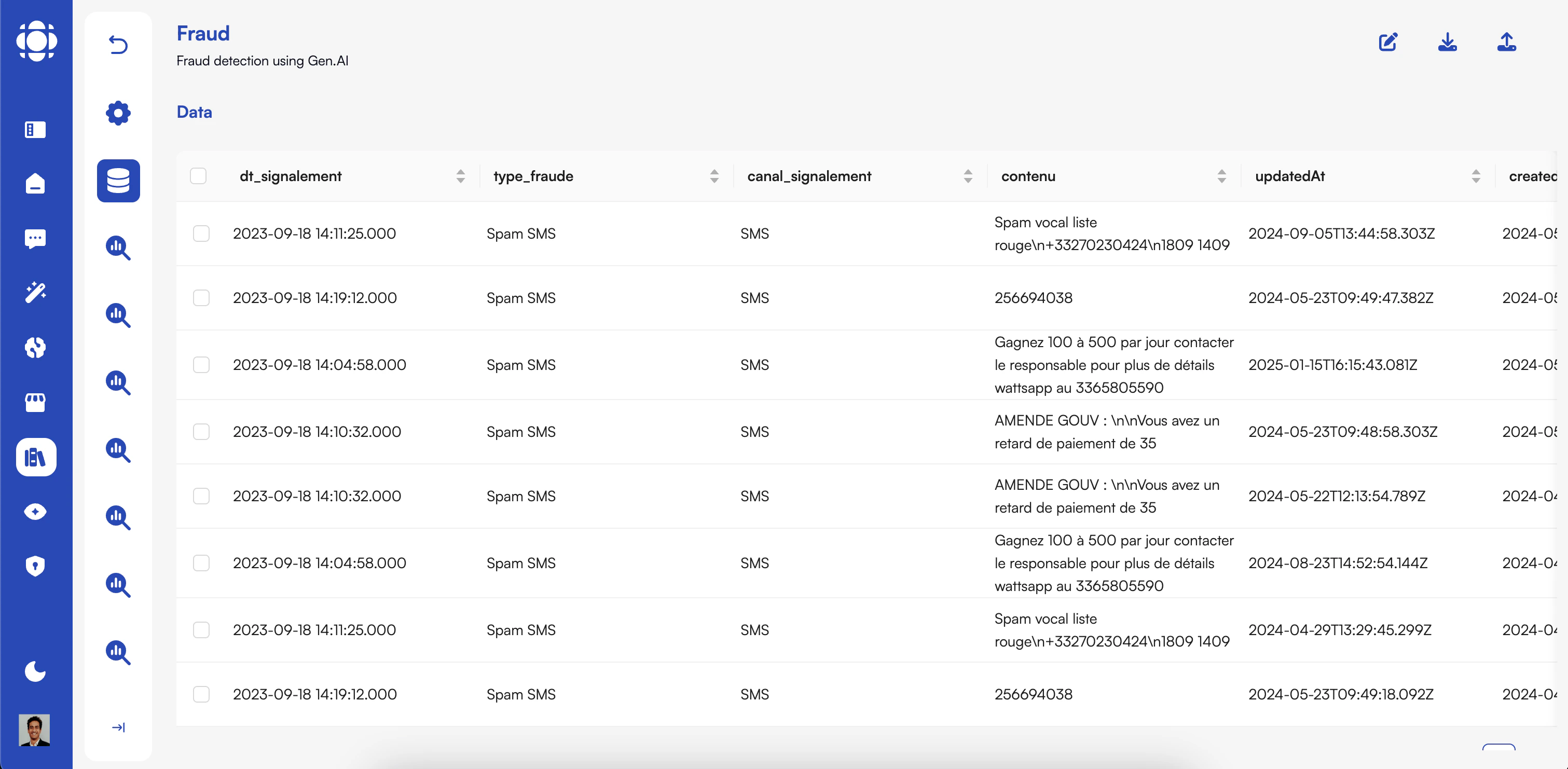 AI Collection is Prisme.ai's enterprise-grade tabular data management platform that enables users to create AI agents for analyzing and enriching structured data. It offers a powerful yet intuitive interface for uploading, processing, and querying tabular data using natural language, all within a secure and managed environment.
## Key Features
Upload data manually or connect to AI Builder, internal tools, or existing databases
Add new columns and enrich data with AI agents processing each row
Query complex tabular data using conversational language
Create and share personalized data views using natural language
Connect with AI Builder to create specialized tools for AI Knowledge agents
Complete data protection with access controls and compliance features
Built-in tools to evaluate and optimize token usage for cost efficiency
Share datasets and custom views with team members for enhanced productivity
## Who Uses AI Collection?
AI Collection is designed for all users who work with structured data, from data analysts to business users with no technical expertise.
Data analysts use AI Collection to:
* Process and transform large datasets quickly
* Enrich data with AI-generated insights
* Create custom views for specific analytical needs
* Build reusable data processing workflows
BI teams use AI Collection to:
* Connect multiple data sources for comprehensive analysis
* Create natural language interfaces to complex data
* Generate custom reports and dashboards
* Share insights across the organization
Product managers and teams use AI Collection to:
* Analyze product usage and performance data
* Enrich product data with market insights
* Create custom views for different stakeholders
* Make data-driven product decisions
Business users with no technical expertise use AI Collection to:
* Access and query complex data through natural language
* Use predefined views to quickly find information
* Generate reports without SQL or programming knowledge
* Share insights with colleagues
## Core Capabilities
### Data Ingestion and Management
AI Collection provides multiple options for bringing data into the platform:
* Manual upload of CSV, Excel, and other tabular formats
* Connection to AI Builder for scraping web data
* Integration with internal tools (CRM, databases, product analytics)
* Automated data refresh and scheduling
* Version control and history tracking
### AI-Powered Data Enrichment
Transform and enhance your data with AI-powered processing:
* Add new columns based on AI analysis of existing data
* Process data row by row with specialized AI agents
* Apply transformation rules using natural language
* Merge and join datasets with intelligent matching
* Detect anomalies and inconsistencies automatically
### Natural Language Querying
Interact with your data using conversational language:
#### For Business Users
* Ask questions about your data in plain English
* Get immediate answers without writing SQL
* Visualize results instantly with auto-generated charts
* Save frequently used queries for quick access
#### For Technical Users
* Generate optimized SQL from natural language
* Fine-tune generated queries for complex analysis
* Create parameterized query templates
* Audit and optimize query performance
### Custom Views
Create and share personalized data views using natural language:
* Define views using conversational descriptions
* Share views with team members and stakeholders
* Set automated refresh schedules for views
* Export views to various formats (CSV, Excel, PDF)
* Embed views in other applications and dashboards
### Integration with Other Prisme.ai Products
AI Collection works seamlessly with other Prisme.ai products:
* **AI Builder** - Create data collection agents that feed into AI Collection
* **AI Knowledge** - Provide data-driven tools for knowledge agents
* **AI SecureChat** - Query data directly within conversations
* **AI Governance** - Apply access controls
* **AI Insights** - Track usage patterns and effectiveness
## Token Optimization
AI Collection includes tools to help you manage token usage and control costs:
Track token consumption across datasets and operations
Preview estimated token usage before processing large datasets
Get AI-powered suggestions to reduce token consumption
Set limits and alerts for token usage at user or team level
## Getting Started with AI Collection
Log in to your Prisme.ai instance and select AI Collection from the main menu.
Upload a dataset or connect to an existing data source.
You can upload CSV files, connect to databases, or pull data from other systems.
Use AI agents to add new columns or transform existing data.
Specify what you want to add in natural language, and AI Collection will process your data.
Generate specialized views of your data using natural language descriptions.
Share these views with your team for quick access to common data insights.
AI Collection is Prisme.ai's enterprise-grade tabular data management platform that enables users to create AI agents for analyzing and enriching structured data. It offers a powerful yet intuitive interface for uploading, processing, and querying tabular data using natural language, all within a secure and managed environment.
## Key Features
Upload data manually or connect to AI Builder, internal tools, or existing databases
Add new columns and enrich data with AI agents processing each row
Query complex tabular data using conversational language
Create and share personalized data views using natural language
Connect with AI Builder to create specialized tools for AI Knowledge agents
Complete data protection with access controls and compliance features
Built-in tools to evaluate and optimize token usage for cost efficiency
Share datasets and custom views with team members for enhanced productivity
## Who Uses AI Collection?
AI Collection is designed for all users who work with structured data, from data analysts to business users with no technical expertise.
Data analysts use AI Collection to:
* Process and transform large datasets quickly
* Enrich data with AI-generated insights
* Create custom views for specific analytical needs
* Build reusable data processing workflows
BI teams use AI Collection to:
* Connect multiple data sources for comprehensive analysis
* Create natural language interfaces to complex data
* Generate custom reports and dashboards
* Share insights across the organization
Product managers and teams use AI Collection to:
* Analyze product usage and performance data
* Enrich product data with market insights
* Create custom views for different stakeholders
* Make data-driven product decisions
Business users with no technical expertise use AI Collection to:
* Access and query complex data through natural language
* Use predefined views to quickly find information
* Generate reports without SQL or programming knowledge
* Share insights with colleagues
## Core Capabilities
### Data Ingestion and Management
AI Collection provides multiple options for bringing data into the platform:
* Manual upload of CSV, Excel, and other tabular formats
* Connection to AI Builder for scraping web data
* Integration with internal tools (CRM, databases, product analytics)
* Automated data refresh and scheduling
* Version control and history tracking
### AI-Powered Data Enrichment
Transform and enhance your data with AI-powered processing:
* Add new columns based on AI analysis of existing data
* Process data row by row with specialized AI agents
* Apply transformation rules using natural language
* Merge and join datasets with intelligent matching
* Detect anomalies and inconsistencies automatically
### Natural Language Querying
Interact with your data using conversational language:
#### For Business Users
* Ask questions about your data in plain English
* Get immediate answers without writing SQL
* Visualize results instantly with auto-generated charts
* Save frequently used queries for quick access
#### For Technical Users
* Generate optimized SQL from natural language
* Fine-tune generated queries for complex analysis
* Create parameterized query templates
* Audit and optimize query performance
### Custom Views
Create and share personalized data views using natural language:
* Define views using conversational descriptions
* Share views with team members and stakeholders
* Set automated refresh schedules for views
* Export views to various formats (CSV, Excel, PDF)
* Embed views in other applications and dashboards
### Integration with Other Prisme.ai Products
AI Collection works seamlessly with other Prisme.ai products:
* **AI Builder** - Create data collection agents that feed into AI Collection
* **AI Knowledge** - Provide data-driven tools for knowledge agents
* **AI SecureChat** - Query data directly within conversations
* **AI Governance** - Apply access controls
* **AI Insights** - Track usage patterns and effectiveness
## Token Optimization
AI Collection includes tools to help you manage token usage and control costs:
Track token consumption across datasets and operations
Preview estimated token usage before processing large datasets
Get AI-powered suggestions to reduce token consumption
Set limits and alerts for token usage at user or team level
## Getting Started with AI Collection
Log in to your Prisme.ai instance and select AI Collection from the main menu.
Upload a dataset or connect to an existing data source.
You can upload CSV files, connect to databases, or pull data from other systems.
Use AI agents to add new columns or transform existing data.
Specify what you want to add in natural language, and AI Collection will process your data.
Generate specialized views of your data using natural language descriptions.
Share these views with your team for quick access to common data insights.