> ## Documentation Index
> Fetch the complete documentation index at: https://prismeai-legacy.mintlify.site/llms.txt
> Use this file to discover all available pages before exploring further.
# Overview
> Discover AI Builder, the orchestration engine at the core of the Prisme.ai platform
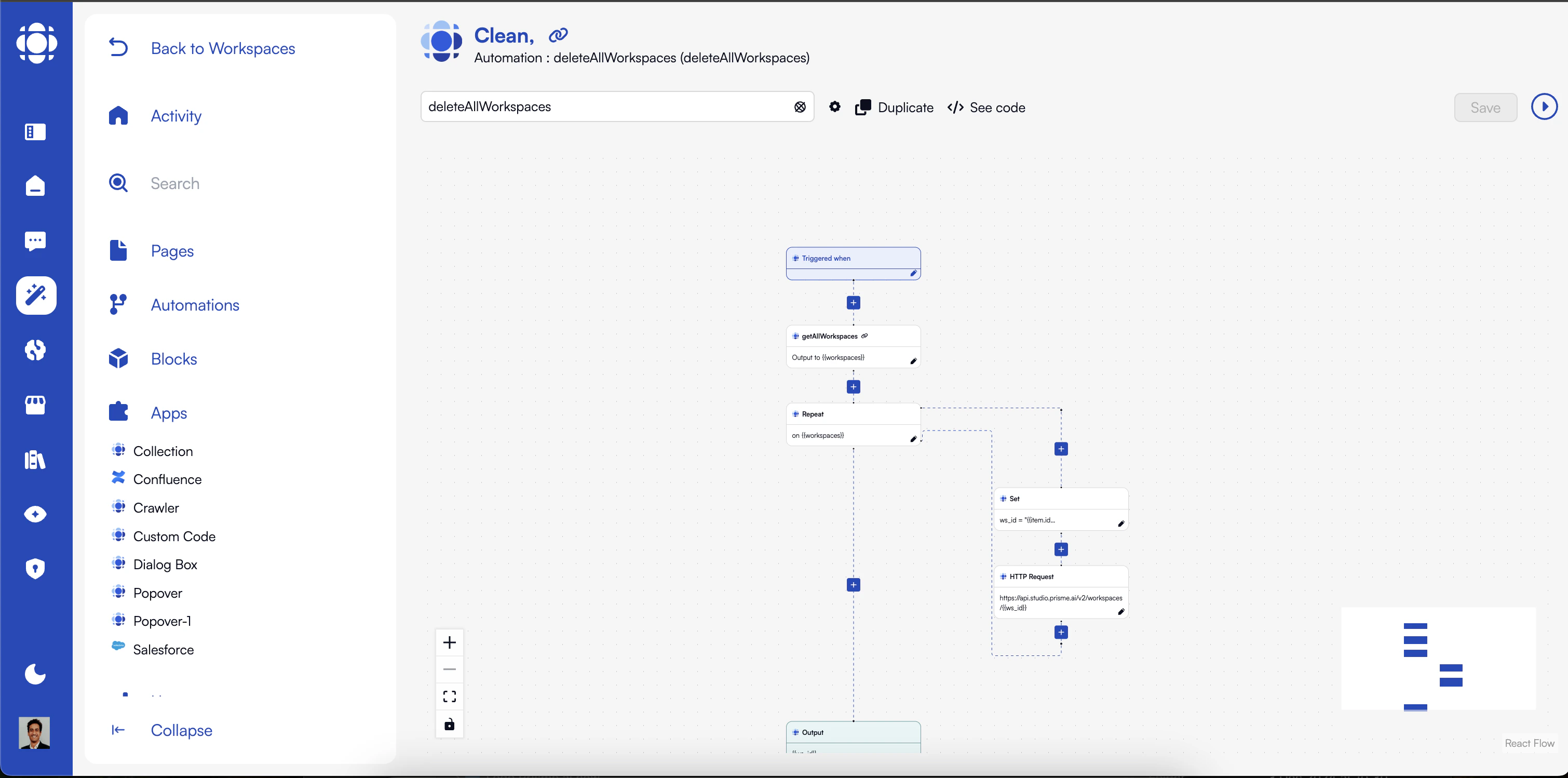 AI Builder is the orchestration engine at the heart of the Prisme.ai platform. It enables you to connect agents with each other and with your enterprise systems, create custom AI use cases, and automate complex workflows while hiding technical complexity from business users.
## The Power of Orchestration
AI Builder serves as the foundation that ensures all other Prisme.ai products function seamlessly:
Connect multiple AI agents to create sophisticated multi-agent systems
Bridge the gap between AI capabilities and your enterprise systems
Build tailored AI solutions for your specific business needs
Automate complex processes through an event-driven architecture
## Technical Versatility with Low-Code Approach
AI Builder offers multiple development approaches to accommodate different technical backgrounds:
Visual interface for creating basic workflows and interfaces without any coding:
* Drag-and-drop components
* Visual workflow builders
* Pre-built templates
* Configuration-based customization
**Ideal for**: Business analysts, process owners, and AI specialists with limited technical background
Blended approach combining visual tools with limited code customization:
* Visual designers with code extension points
* Custom expressions and formulas
* Logic customization through simplified scripting
* Component property manipulation
**Ideal for**: Technical business users, citizen developers, and IT professionals
Full development capabilities for complex scenarios:
* JavaScript/TypeScript for frontend components
* Node.js for backend automations
* Python for data processing and machine learning
* CSS for styling customization
**Ideal for**: Developers, data scientists, and IT professionals with programming experience
## Getting Started with AI Builder
Start by creating a new workspace or selecting from available templates.
A workspace is your dedicated environment for building and connecting all your AI components. It includes:
* Pages for user interfaces
* Blocks for reusable UI components
* Automations for backend logic
* Activity logs for monitoring and debugging
Create pages by assembling blocks that users will interact with.
Pages are built by:
* Selecting from pre-built blocks
* Arranging them in a layout
* Configuring their properties
* Connecting them to automations via events
Create backend logic to process data and connect to systems.
Automations can be triggered by:
* User interactions via events
* HTTP requests to create APIs
* Scheduled tasks using cron expressions
* Other automations in a workflow
Validate your implementation and monitor its performance.
The Activity panel provides:
* Real-time event monitoring
* Error detection and diagnosis
* Performance metrics
* Usage statistics
Make your solution available to users.
Deployment options include:
* Direct access to workspace pages
* Packaging as a reusable app
* Version control for iterative development
* Role-based access control
## Key Components of AI Builder
AI Builder is organized around several core concepts that work together to create powerful AI applications:
A workspace is your project environment that contains all components and manages interactions between them:
* **Unique Slug**: Each workspace has a unique identifier used in URLs
* **Event-Driven Architecture**: Components communicate through events
* **Activity Monitoring**: Centralized logging of all events and actions
* **Access Control**: Role-based permissions for team collaboration
* **Versioning**: Track changes and manage versions
Workspaces can be created from scratch or from templates provided through AI Governance.
Blocks are reusable UI components that users interact with:
* **Built-in Blocks**: Ready-to-use components like chats, forms, tables
* **Marketplace Blocks**: Additional components from installed apps
* **Custom Blocks**: Your own blocks built using the design system
* **Event Communication**: Blocks emit and listen for events
* **Styling**: Customizable appearance through properties and CSS
Blocks are the building blocks for creating user interfaces in pages.
Pages are assemblies of blocks that create complete user interfaces:
* **Layouts**: Arrange blocks in different configurations
* **Navigation**: Connected through links and events
* **Access Control**: Public, private, or shared with specific users
* **URLs**: Accessible through predictable URL patterns
* **Responsive Design**: Adapt to different device sizes
Pages use Next.js for optimal performance and SEO capabilities.
Automations are backend processes that execute business logic:
* **Triggers**: Events, URLs (APIs/webhooks), or schedules
* **Instructions**: Built-in actions, conditionals, loops
* **Integration**: Connect to external systems and APIs
* **Data Processing**: Transform and manipulate information
* **Event Emission**: Trigger other automations or update UI
Automations represent the server-side logic of your application.
Apps are installable packages that extend capabilities:
* **Marketplace**: Browse and install pre-built apps
* **Components**: May include blocks, automations, or both
* **Configuration**: Some apps require setup (API keys, etc.)
* **Documentation**: Usage instructions for implementation
* **Versioning**: Update apps independently
Apps accelerate development by providing pre-built functionality.
## AI Builder in the Prisme.ai Ecosystem
AI Builder connects with other Prisme.ai products to create a comprehensive platform:
Extend chat capabilities with custom workflows and interfaces
Deploy complex agents with custom interfaces and backend logic
Augment RAG systems with advanced orchestration and webhooks
Create advanced data pipelines and analytics workflows
Implement company-wide templates and security policies
Build custom analytics dashboards and monitoring tools
## Memory and State Management
AI Builder provides several memory scopes for maintaining state:
Available as `{{user.id}}`, `{{user.email}}`, `{{user.authData}}`
Available through `{{session}}` variables
Available through `{{global}}` variables
Available as `{{run.ip}}`, `{{run.date}}`, `{{run.slug}}`
Available by installing the Collection app
## Next Steps
Learn about the technical architecture of AI Builder
Discover how to create and use UI components
Build complete user interfaces
Create backend logic and workflows
Connect to external systems and APIs
Explore real-world implementation examples
AI Builder is the orchestration engine at the heart of the Prisme.ai platform. It enables you to connect agents with each other and with your enterprise systems, create custom AI use cases, and automate complex workflows while hiding technical complexity from business users.
## The Power of Orchestration
AI Builder serves as the foundation that ensures all other Prisme.ai products function seamlessly:
Connect multiple AI agents to create sophisticated multi-agent systems
Bridge the gap between AI capabilities and your enterprise systems
Build tailored AI solutions for your specific business needs
Automate complex processes through an event-driven architecture
## Technical Versatility with Low-Code Approach
AI Builder offers multiple development approaches to accommodate different technical backgrounds:
Visual interface for creating basic workflows and interfaces without any coding:
* Drag-and-drop components
* Visual workflow builders
* Pre-built templates
* Configuration-based customization
**Ideal for**: Business analysts, process owners, and AI specialists with limited technical background
Blended approach combining visual tools with limited code customization:
* Visual designers with code extension points
* Custom expressions and formulas
* Logic customization through simplified scripting
* Component property manipulation
**Ideal for**: Technical business users, citizen developers, and IT professionals
Full development capabilities for complex scenarios:
* JavaScript/TypeScript for frontend components
* Node.js for backend automations
* Python for data processing and machine learning
* CSS for styling customization
**Ideal for**: Developers, data scientists, and IT professionals with programming experience
## Getting Started with AI Builder
Start by creating a new workspace or selecting from available templates.
A workspace is your dedicated environment for building and connecting all your AI components. It includes:
* Pages for user interfaces
* Blocks for reusable UI components
* Automations for backend logic
* Activity logs for monitoring and debugging
Create pages by assembling blocks that users will interact with.
Pages are built by:
* Selecting from pre-built blocks
* Arranging them in a layout
* Configuring their properties
* Connecting them to automations via events
Create backend logic to process data and connect to systems.
Automations can be triggered by:
* User interactions via events
* HTTP requests to create APIs
* Scheduled tasks using cron expressions
* Other automations in a workflow
Validate your implementation and monitor its performance.
The Activity panel provides:
* Real-time event monitoring
* Error detection and diagnosis
* Performance metrics
* Usage statistics
Make your solution available to users.
Deployment options include:
* Direct access to workspace pages
* Packaging as a reusable app
* Version control for iterative development
* Role-based access control
## Key Components of AI Builder
AI Builder is organized around several core concepts that work together to create powerful AI applications:
A workspace is your project environment that contains all components and manages interactions between them:
* **Unique Slug**: Each workspace has a unique identifier used in URLs
* **Event-Driven Architecture**: Components communicate through events
* **Activity Monitoring**: Centralized logging of all events and actions
* **Access Control**: Role-based permissions for team collaboration
* **Versioning**: Track changes and manage versions
Workspaces can be created from scratch or from templates provided through AI Governance.
Blocks are reusable UI components that users interact with:
* **Built-in Blocks**: Ready-to-use components like chats, forms, tables
* **Marketplace Blocks**: Additional components from installed apps
* **Custom Blocks**: Your own blocks built using the design system
* **Event Communication**: Blocks emit and listen for events
* **Styling**: Customizable appearance through properties and CSS
Blocks are the building blocks for creating user interfaces in pages.
Pages are assemblies of blocks that create complete user interfaces:
* **Layouts**: Arrange blocks in different configurations
* **Navigation**: Connected through links and events
* **Access Control**: Public, private, or shared with specific users
* **URLs**: Accessible through predictable URL patterns
* **Responsive Design**: Adapt to different device sizes
Pages use Next.js for optimal performance and SEO capabilities.
Automations are backend processes that execute business logic:
* **Triggers**: Events, URLs (APIs/webhooks), or schedules
* **Instructions**: Built-in actions, conditionals, loops
* **Integration**: Connect to external systems and APIs
* **Data Processing**: Transform and manipulate information
* **Event Emission**: Trigger other automations or update UI
Automations represent the server-side logic of your application.
Apps are installable packages that extend capabilities:
* **Marketplace**: Browse and install pre-built apps
* **Components**: May include blocks, automations, or both
* **Configuration**: Some apps require setup (API keys, etc.)
* **Documentation**: Usage instructions for implementation
* **Versioning**: Update apps independently
Apps accelerate development by providing pre-built functionality.
## AI Builder in the Prisme.ai Ecosystem
AI Builder connects with other Prisme.ai products to create a comprehensive platform:
Extend chat capabilities with custom workflows and interfaces
Deploy complex agents with custom interfaces and backend logic
Augment RAG systems with advanced orchestration and webhooks
Create advanced data pipelines and analytics workflows
Implement company-wide templates and security policies
Build custom analytics dashboards and monitoring tools
## Memory and State Management
AI Builder provides several memory scopes for maintaining state:
Available as `{{user.id}}`, `{{user.email}}`, `{{user.authData}}`
Available through `{{session}}` variables
Available through `{{global}}` variables
Available as `{{run.ip}}`, `{{run.date}}`, `{{run.slug}}`
Available by installing the Collection app
## Next Steps
Learn about the technical architecture of AI Builder
Discover how to create and use UI components
Build complete user interfaces
Create backend logic and workflows
Connect to external systems and APIs
Explore real-world implementation examples