> ## Documentation Index
> Fetch the complete documentation index at: https://prismeai-legacy.mintlify.site/llms.txt
> Use this file to discover all available pages before exploring further.
# Integrations (Apps)
> Connect your AI Builder applications to external systems, databases, and services
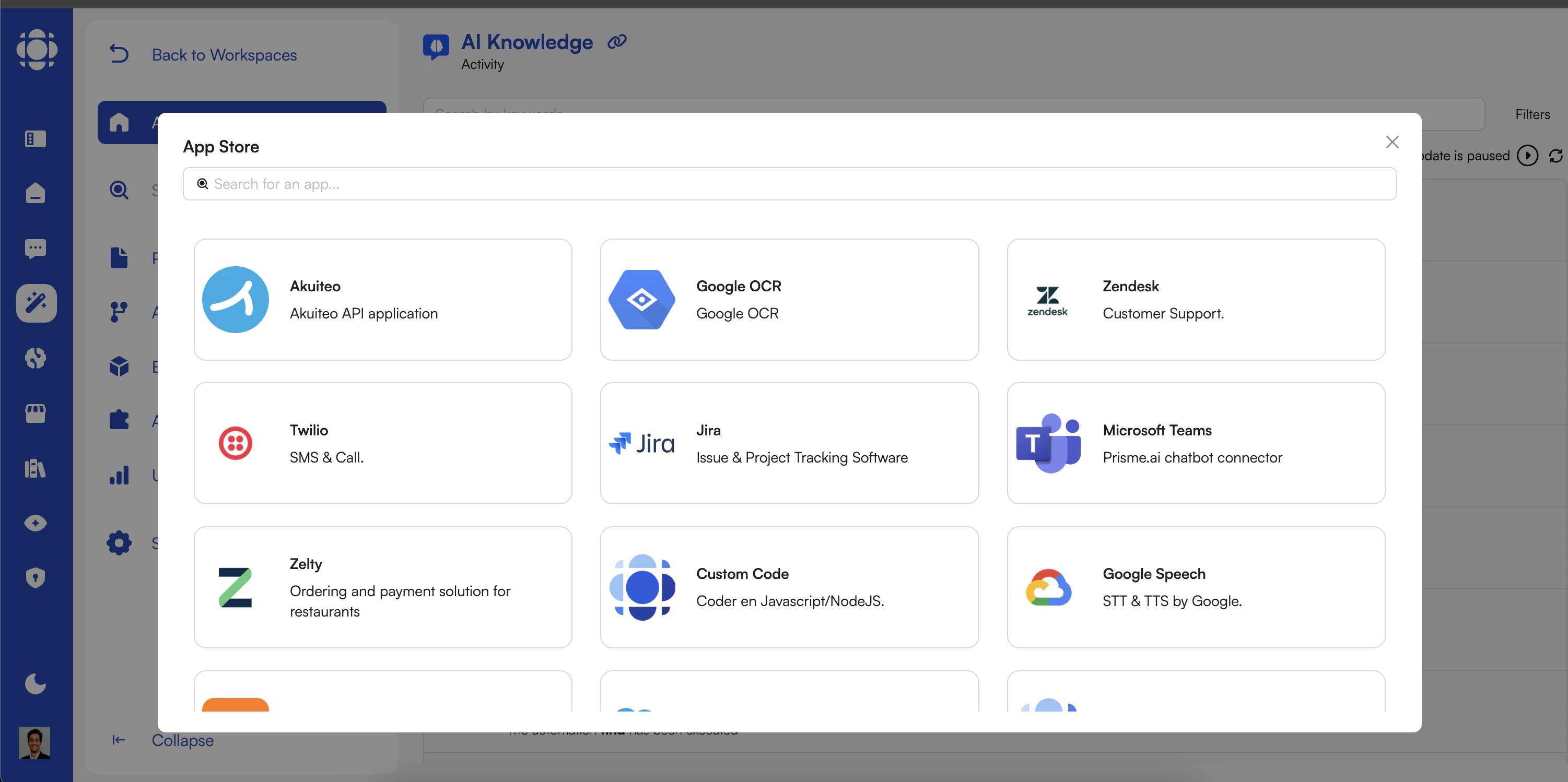 Integrations (Apps) allow your AI Builder applications to connect with external systems, databases, APIs, and services. This connectivity is essential for creating AI solutions that work within your existing technology ecosystem and deliver real business value.
## Integration Fundamentals
AI Builder supports various integration approaches:
* **API Integrations**: Connect to external services via REST, GraphQL, or other API protocols
* **Database Connections**: Access and manipulate data in various database systems
* **Webhook Mechanisms**: Receive and send event notifications to external systems
* **File System Operations**: Read, write, and process files in various formats
* **Authentication Systems**: Connect with identity providers and SSO solutions
* **Marketplace Apps**: Pre-built integrations installed from the app marketplace
Each type serves different integration needs and scenarios.
AI Builder integrations follow a modern, secure architecture:
* **Isolation**: Each integration operates in its own secure context
* **Authentication**: Secure credential management and authentication flows
* **Authorization**: Fine-grained access control to integration capabilities
* **Monitoring**: Comprehensive logging and performance tracking
* **Error Handling**: Robust error management and recovery mechanisms
This architecture ensures reliable, secure integrations with external systems.
Integrations can be implemented through:
* **Built-in Instructions**: Using pre-built automation instructions for common integration patterns
* **Marketplace Apps**: Installing pre-configured integration apps
* **Custom Development**: Creating specialized integration logic with code
* **API Configuration**: Setting up connections to external APIs and services
* **Authentication Setup**: Configuring secure access to protected resources
The flexibility of implementation approaches accommodates various technical requirements.
## API Integrations
Connect to external APIs using HTTP requests.
HTTP integration supports:
* **Methods**: GET, POST, PUT, DELETE, PATCH
* **Headers**: Custom headers for authentication and metadata
* **Query Parameters**: URL parameters for request configuration
* **Request Bodies**: JSON, XML, form data, and other formats
* **Response Handling**: Processing various response formats and status codes
HTTP is the foundation for most modern API integrations.
Configure secure authentication for API access.
Authentication methods include:
* **API Keys**: Simple key-based authentication
* **OAuth 2.0**: Token-based authentication flow
* **Basic Auth**: Username/password authentication
* **JWT**: JSON Web Token authentication
* **Custom Schemes**: Specialized authentication mechanisms
Proper authentication ensures secure access to protected resources.
Process data between your application and external APIs.
Transformation capabilities include:
* **Format Conversion**: Between JSON, XML, CSV, and other formats
* **Field Mapping**: Align field names and structures
* **Data Filtering**: Include only relevant information
* **Aggregation**: Combine data from multiple sources
* **Normalization**: Standardize data formats and values
Transformation ensures compatibility between systems with different data models.
Implement robust error management strategies.
Error handling approaches:
* **Status Code Handling**: Respond to different HTTP status codes
* **Retry Logic**: Attempt failed requests again
* **Fallback Strategies**: Alternative approaches when integrations fail
* **Error Logging**: Record detailed error information
* **User Feedback**: Provide appropriate information to users
Effective error handling creates resilient integrations that gracefully handle failures.
## Database Integrations
Connect to various database systems to work with structured data:
Connect to SQL databases such as:
* MySQL
* PostgreSQL
* SQL Server
* Oracle
* SQLite
Ensures optimal performance and resource utilization
Full support for database operations
Protects against SQL injection and unauthorized access
Example configuration for a PostgreSQL connection:
```yaml theme={null}
connection:
type: postgresql
host: database.example.com
port: 5432
database: customer_data
username: "{{secrets.DB_USERNAME}}"
password: "{{secrets.DB_PASSWORD}}"
ssl: true
pool:
min: 5
max: 20
```
Connect to document, key-value, and graph databases:
* MongoDB
* Cosmos DB
* Redis
* Cassandra
* Neo4j
Optimized for each database type
Database-specific operation support
Comprehensive security capabilities
Example configuration for a MongoDB connection:
```yaml theme={null}
connection:
type: mongodb
uri: "mongodb+srv://{{secrets.MONGO_USERNAME}}:{{secrets.MONGO_PASSWORD}}@cluster.example.mongodb.net"
database: analytics
options:
retryWrites: true
w: majority
maxPoolSize: 10
```
Connect to specialized vector databases for AI applications:
* Pinecone
* Weaviate
* Milvus
* Qdrant
* ChromaDB
Optimized for vector operations
Specialized for AI workloads
Security appropriate for AI data
Example configuration for a Pinecone connection:
```yaml theme={null}
connection:
type: pinecone
apiKey: "{{secrets.PINECONE_API_KEY}}"
environment: us-west1-gcp
projectId: "e12345-abc-123"
namespace: customer-support
dimensions: 1536
```
## Webhook Integrations
Implement event-driven integrations with external systems:
Receive events and notifications from external systems:
* **Endpoint Creation**: Generate unique webhook URLs
* **Authentication**: Verify webhook sources
* **Payload Processing**: Parse and validate incoming data
* **Event Routing**: Direct webhooks to appropriate handlers
* **Response Generation**: Acknowledge receipt with appropriate responses
Each automation can serve as a webhook endpoint
Ensures webhooks come from authorized sources
Flexibility for different processing needs
Example automation for receiving GitHub webhooks:
```
[Trigger: API (webhook)]
↓
[Verify Signature: github-signature header]
↓
[Condition: Valid signature?]
├─ [Yes] → [Parse webhook payload]
│ ↓
│ [Switch: Based on event type]
│ ├─ [push] → [Process code push]
│ ├─ [issue] → [Process issue update]
│ └─ [release] → [Process release]
│
└─ [No] → [Log security warning]
↓
[Return 401 Unauthorized]
```
Send events and notifications to external systems:
* **Destination Configuration**: Configure target URLs
* **Payload Formatting**: Structure event data appropriately
* **Authentication**: Add necessary authentication
* **Delivery Confirmation**: Verify successful delivery
* **Retry Management**: Handle delivery failures
Various sources can trigger outbound webhooks
Authenticate with receiving systems
Fits different integration patterns
Example automation for sending a Slack notification:
```
[Trigger: New document created event]
↓
[Format Webhook Payload]
↓
[HTTP Request: POST to Slack webhook URL]
↓
[Condition: Successful delivery?]
├─ [Yes] → [Log successful notification]
│
└─ [No] → [Retry logic]
↓
[If still failing after retries, log error]
```
Implement secure webhook patterns:
* **Signature Verification**: Validate webhook authenticity
* **Payload Encryption**: Protect sensitive data
* **Rate Limiting**: Prevent abuse
* **IP Restrictions**: Limit webhook sources
* **Payload Validation**: Ensure data meets expectations
Industry standard for webhook verification
Protects authentication credentials
Ensures data integrity and security
Example HMAC signature verification logic:
```javascript theme={null}
const crypto = require('crypto');
function verifyWebhook(payload, secret, signature) {
const hmac = crypto.createHmac('sha256', secret);
const computedSignature = hmac.update(payload).digest('hex');
return crypto.timingSafeEqual(
Buffer.from(computedSignature),
Buffer.from(signature)
);
}
```
## Authentication & Authorization
Secure your integrations with robust authentication and authorization:
Authenticate with external services:
* **API Keys**: Simple key-based authentication
* **OAuth 2.0**: Token-based authentication with various flows
* Authorization Code
* Client Credentials
* Resource Owner Password
* Implicit Flow
* **Bearer Tokens**: Token-based authentication
* **Basic Authentication**: Username/password encoded in headers
* **Custom Authentication**: Specialized methods for specific services
Uses workspace secrets for sensitive information
Automatically refreshes expired tokens
Handles redirects and callbacks
Securely store and use sensitive credentials:
* **Workspace Secrets**: Store sensitive values
* **Reference Notation**: `{{secrets.KEY_NAME}}` syntax
* **Access Control**: Restricted visibility of secret values
* **Version History**: Track credential changes
* **Environment Separation**: Different secrets per environment
Industry-standard encryption
Prevents exposure of raw values
Supports various credential types
Control access to integration capabilities:
* **Role-Based Access Control**: Limit integration usage by role
* **Scopes**: Fine-grained permissions for API access
* **IP Restrictions**: Limit integration access by network
* **Rate Limiting**: Control usage frequency
* **Usage Quotas**: Set limits on integration usage
Controls who can use which integrations
Records all integration activity
Ensures proper access control
## File System Integrations
Work with files in various storage systems:
Access files within the workspace environment:
* **File Reading**: Load file contents
* **File Writing**: Create or update files
* **Directory Operations**: List, create, delete directories
* **File Properties**: Get metadata about files
* **Path Management**: Work with file paths
Isolated storage per workspace
Prevents unauthorized access
Flexibility for different performance needs
Example file reading operation:
```javascript theme={null}
// Read a file asynchronously
const content = await fs.readFile('/path/to/file.txt', 'utf8');
console.log(content);
// Write to a file
await fs.writeFile('/path/to/output.txt', 'Hello, world!', 'utf8');
```
Connect to cloud-based storage services:
* **AWS S3**: Amazon Simple Storage Service
* **Azure Blob Storage**: Microsoft's object storage
* **Google Cloud Storage**: Google's object storage
* **Dropbox**: File hosting service
* **OneDrive/SharePoint**: Microsoft's document storage
Complete file management
Secure access to cloud storage
Specialized cloud capabilities
Example S3 integration configuration:
```yaml theme={null}
storage:
type: s3
region: us-west-2
bucket: my-application-files
accessKeyId: "{{secrets.AWS_ACCESS_KEY_ID}}"
secretAccessKey: "{{secrets.AWS_SECRET_ACCESS_KEY}}"
defaultACL: private
```
Process various document formats:
* **PDF**: Parse and extract PDF content
* **Office Documents**: Work with Word, Excel, PowerPoint
* **CSV/TSV**: Process structured data files
* **JSON/XML**: Parse and generate structured formats
* **Images**: Process image files with OCR
Comprehensive data extraction
Transformation capabilities
Document understanding
Example document processing automation:
```
[Trigger: File uploaded event]
↓
[Condition: File type?]
├─ [PDF] → [Extract text from PDF]
├─ [DOCX] → [Extract text from Word document]
├─ [XLSX] → [Extract tables from Excel]
├─ [Image] → [Perform OCR on image]
└─ [Other] → [Return unsupported format error]
↓
[Process extracted content]
↓
[Store results]
```
## Marketplace Integration Apps
Accelerate integration with pre-built marketplace apps:
Explore the integration apps in the marketplace.
The marketplace provides:
* Categorized integration listings
* Detailed descriptions and capabilities
* User ratings and reviews
* Documentation and examples
* Version history and updates
Add integrations to your workspace.
The installation process:
1. Select the desired app from the marketplace
2. Review permissions and capabilities
3. Approve the installation
4. Configure app-specific settings
5. Set up authentication if required
Set up the integration for your specific needs.
Configuration typically includes:
* Connection settings (endpoints, hosts)
* Authentication credentials
* Default behavior options
* Logging and monitoring preferences
* Feature toggles and limitations
Leverage the integrated functionality in your workspace.
Integration apps provide:
* Custom blocks for UI integration
* Automation instructions for backend integration
* Events for integration state changes
* Documentation on usage patterns
* Examples for common scenarios
## Popular Integration Categories
Connect with common workplace tools:
Integrations (Apps) allow your AI Builder applications to connect with external systems, databases, APIs, and services. This connectivity is essential for creating AI solutions that work within your existing technology ecosystem and deliver real business value.
## Integration Fundamentals
AI Builder supports various integration approaches:
* **API Integrations**: Connect to external services via REST, GraphQL, or other API protocols
* **Database Connections**: Access and manipulate data in various database systems
* **Webhook Mechanisms**: Receive and send event notifications to external systems
* **File System Operations**: Read, write, and process files in various formats
* **Authentication Systems**: Connect with identity providers and SSO solutions
* **Marketplace Apps**: Pre-built integrations installed from the app marketplace
Each type serves different integration needs and scenarios.
AI Builder integrations follow a modern, secure architecture:
* **Isolation**: Each integration operates in its own secure context
* **Authentication**: Secure credential management and authentication flows
* **Authorization**: Fine-grained access control to integration capabilities
* **Monitoring**: Comprehensive logging and performance tracking
* **Error Handling**: Robust error management and recovery mechanisms
This architecture ensures reliable, secure integrations with external systems.
Integrations can be implemented through:
* **Built-in Instructions**: Using pre-built automation instructions for common integration patterns
* **Marketplace Apps**: Installing pre-configured integration apps
* **Custom Development**: Creating specialized integration logic with code
* **API Configuration**: Setting up connections to external APIs and services
* **Authentication Setup**: Configuring secure access to protected resources
The flexibility of implementation approaches accommodates various technical requirements.
## API Integrations
Connect to external APIs using HTTP requests.
HTTP integration supports:
* **Methods**: GET, POST, PUT, DELETE, PATCH
* **Headers**: Custom headers for authentication and metadata
* **Query Parameters**: URL parameters for request configuration
* **Request Bodies**: JSON, XML, form data, and other formats
* **Response Handling**: Processing various response formats and status codes
HTTP is the foundation for most modern API integrations.
Configure secure authentication for API access.
Authentication methods include:
* **API Keys**: Simple key-based authentication
* **OAuth 2.0**: Token-based authentication flow
* **Basic Auth**: Username/password authentication
* **JWT**: JSON Web Token authentication
* **Custom Schemes**: Specialized authentication mechanisms
Proper authentication ensures secure access to protected resources.
Process data between your application and external APIs.
Transformation capabilities include:
* **Format Conversion**: Between JSON, XML, CSV, and other formats
* **Field Mapping**: Align field names and structures
* **Data Filtering**: Include only relevant information
* **Aggregation**: Combine data from multiple sources
* **Normalization**: Standardize data formats and values
Transformation ensures compatibility between systems with different data models.
Implement robust error management strategies.
Error handling approaches:
* **Status Code Handling**: Respond to different HTTP status codes
* **Retry Logic**: Attempt failed requests again
* **Fallback Strategies**: Alternative approaches when integrations fail
* **Error Logging**: Record detailed error information
* **User Feedback**: Provide appropriate information to users
Effective error handling creates resilient integrations that gracefully handle failures.
## Database Integrations
Connect to various database systems to work with structured data:
Connect to SQL databases such as:
* MySQL
* PostgreSQL
* SQL Server
* Oracle
* SQLite
Ensures optimal performance and resource utilization
Full support for database operations
Protects against SQL injection and unauthorized access
Example configuration for a PostgreSQL connection:
```yaml theme={null}
connection:
type: postgresql
host: database.example.com
port: 5432
database: customer_data
username: "{{secrets.DB_USERNAME}}"
password: "{{secrets.DB_PASSWORD}}"
ssl: true
pool:
min: 5
max: 20
```
Connect to document, key-value, and graph databases:
* MongoDB
* Cosmos DB
* Redis
* Cassandra
* Neo4j
Optimized for each database type
Database-specific operation support
Comprehensive security capabilities
Example configuration for a MongoDB connection:
```yaml theme={null}
connection:
type: mongodb
uri: "mongodb+srv://{{secrets.MONGO_USERNAME}}:{{secrets.MONGO_PASSWORD}}@cluster.example.mongodb.net"
database: analytics
options:
retryWrites: true
w: majority
maxPoolSize: 10
```
Connect to specialized vector databases for AI applications:
* Pinecone
* Weaviate
* Milvus
* Qdrant
* ChromaDB
Optimized for vector operations
Specialized for AI workloads
Security appropriate for AI data
Example configuration for a Pinecone connection:
```yaml theme={null}
connection:
type: pinecone
apiKey: "{{secrets.PINECONE_API_KEY}}"
environment: us-west1-gcp
projectId: "e12345-abc-123"
namespace: customer-support
dimensions: 1536
```
## Webhook Integrations
Implement event-driven integrations with external systems:
Receive events and notifications from external systems:
* **Endpoint Creation**: Generate unique webhook URLs
* **Authentication**: Verify webhook sources
* **Payload Processing**: Parse and validate incoming data
* **Event Routing**: Direct webhooks to appropriate handlers
* **Response Generation**: Acknowledge receipt with appropriate responses
Each automation can serve as a webhook endpoint
Ensures webhooks come from authorized sources
Flexibility for different processing needs
Example automation for receiving GitHub webhooks:
```
[Trigger: API (webhook)]
↓
[Verify Signature: github-signature header]
↓
[Condition: Valid signature?]
├─ [Yes] → [Parse webhook payload]
│ ↓
│ [Switch: Based on event type]
│ ├─ [push] → [Process code push]
│ ├─ [issue] → [Process issue update]
│ └─ [release] → [Process release]
│
└─ [No] → [Log security warning]
↓
[Return 401 Unauthorized]
```
Send events and notifications to external systems:
* **Destination Configuration**: Configure target URLs
* **Payload Formatting**: Structure event data appropriately
* **Authentication**: Add necessary authentication
* **Delivery Confirmation**: Verify successful delivery
* **Retry Management**: Handle delivery failures
Various sources can trigger outbound webhooks
Authenticate with receiving systems
Fits different integration patterns
Example automation for sending a Slack notification:
```
[Trigger: New document created event]
↓
[Format Webhook Payload]
↓
[HTTP Request: POST to Slack webhook URL]
↓
[Condition: Successful delivery?]
├─ [Yes] → [Log successful notification]
│
└─ [No] → [Retry logic]
↓
[If still failing after retries, log error]
```
Implement secure webhook patterns:
* **Signature Verification**: Validate webhook authenticity
* **Payload Encryption**: Protect sensitive data
* **Rate Limiting**: Prevent abuse
* **IP Restrictions**: Limit webhook sources
* **Payload Validation**: Ensure data meets expectations
Industry standard for webhook verification
Protects authentication credentials
Ensures data integrity and security
Example HMAC signature verification logic:
```javascript theme={null}
const crypto = require('crypto');
function verifyWebhook(payload, secret, signature) {
const hmac = crypto.createHmac('sha256', secret);
const computedSignature = hmac.update(payload).digest('hex');
return crypto.timingSafeEqual(
Buffer.from(computedSignature),
Buffer.from(signature)
);
}
```
## Authentication & Authorization
Secure your integrations with robust authentication and authorization:
Authenticate with external services:
* **API Keys**: Simple key-based authentication
* **OAuth 2.0**: Token-based authentication with various flows
* Authorization Code
* Client Credentials
* Resource Owner Password
* Implicit Flow
* **Bearer Tokens**: Token-based authentication
* **Basic Authentication**: Username/password encoded in headers
* **Custom Authentication**: Specialized methods for specific services
Uses workspace secrets for sensitive information
Automatically refreshes expired tokens
Handles redirects and callbacks
Securely store and use sensitive credentials:
* **Workspace Secrets**: Store sensitive values
* **Reference Notation**: `{{secrets.KEY_NAME}}` syntax
* **Access Control**: Restricted visibility of secret values
* **Version History**: Track credential changes
* **Environment Separation**: Different secrets per environment
Industry-standard encryption
Prevents exposure of raw values
Supports various credential types
Control access to integration capabilities:
* **Role-Based Access Control**: Limit integration usage by role
* **Scopes**: Fine-grained permissions for API access
* **IP Restrictions**: Limit integration access by network
* **Rate Limiting**: Control usage frequency
* **Usage Quotas**: Set limits on integration usage
Controls who can use which integrations
Records all integration activity
Ensures proper access control
## File System Integrations
Work with files in various storage systems:
Access files within the workspace environment:
* **File Reading**: Load file contents
* **File Writing**: Create or update files
* **Directory Operations**: List, create, delete directories
* **File Properties**: Get metadata about files
* **Path Management**: Work with file paths
Isolated storage per workspace
Prevents unauthorized access
Flexibility for different performance needs
Example file reading operation:
```javascript theme={null}
// Read a file asynchronously
const content = await fs.readFile('/path/to/file.txt', 'utf8');
console.log(content);
// Write to a file
await fs.writeFile('/path/to/output.txt', 'Hello, world!', 'utf8');
```
Connect to cloud-based storage services:
* **AWS S3**: Amazon Simple Storage Service
* **Azure Blob Storage**: Microsoft's object storage
* **Google Cloud Storage**: Google's object storage
* **Dropbox**: File hosting service
* **OneDrive/SharePoint**: Microsoft's document storage
Complete file management
Secure access to cloud storage
Specialized cloud capabilities
Example S3 integration configuration:
```yaml theme={null}
storage:
type: s3
region: us-west-2
bucket: my-application-files
accessKeyId: "{{secrets.AWS_ACCESS_KEY_ID}}"
secretAccessKey: "{{secrets.AWS_SECRET_ACCESS_KEY}}"
defaultACL: private
```
Process various document formats:
* **PDF**: Parse and extract PDF content
* **Office Documents**: Work with Word, Excel, PowerPoint
* **CSV/TSV**: Process structured data files
* **JSON/XML**: Parse and generate structured formats
* **Images**: Process image files with OCR
Comprehensive data extraction
Transformation capabilities
Document understanding
Example document processing automation:
```
[Trigger: File uploaded event]
↓
[Condition: File type?]
├─ [PDF] → [Extract text from PDF]
├─ [DOCX] → [Extract text from Word document]
├─ [XLSX] → [Extract tables from Excel]
├─ [Image] → [Perform OCR on image]
└─ [Other] → [Return unsupported format error]
↓
[Process extracted content]
↓
[Store results]
```
## Marketplace Integration Apps
Accelerate integration with pre-built marketplace apps:
Explore the integration apps in the marketplace.
The marketplace provides:
* Categorized integration listings
* Detailed descriptions and capabilities
* User ratings and reviews
* Documentation and examples
* Version history and updates
Add integrations to your workspace.
The installation process:
1. Select the desired app from the marketplace
2. Review permissions and capabilities
3. Approve the installation
4. Configure app-specific settings
5. Set up authentication if required
Set up the integration for your specific needs.
Configuration typically includes:
* Connection settings (endpoints, hosts)
* Authentication credentials
* Default behavior options
* Logging and monitoring preferences
* Feature toggles and limitations
Leverage the integrated functionality in your workspace.
Integration apps provide:
* Custom blocks for UI integration
* Automation instructions for backend integration
* Events for integration state changes
* Documentation on usage patterns
* Examples for common scenarios
## Popular Integration Categories
Connect with common workplace tools:
Microsoft 365 (Outlook, Teams, SharePoint)
Google Workspace (Gmail, Drive, Calendar)
Slack
Zoom
Trello, Asana, Monday.com
Integrate with customer relationship platforms:
Salesforce
HubSpot
Dynamics 365
Zendesk
Pipedrive
Connect to data platforms and analytics tools:
Snowflake
Databricks
Power BI
Tableau
Looker
Integrate with core business systems:
SAP
Oracle ERP
ServiceNow
Workday
NetSuite
Connect with development and DevOps platforms:
GitHub
GitLab
Jira
Azure DevOps
Bitbucket
Integrate with AI and ML services:
OpenAI
Azure Cognitive Services
Google Vertex AI
Hugging Face
AWS AI Services
## Creating Custom Integrations
For specialized requirements, develop your own integrations:
Create integrations using existing automation capabilities:
* Combine HTTP requests with data transformations
* Set up authentication flows
* Implement error handling and retries
* Create event-based integration patterns
* Build data synchronization processes
This approach requires no coding but may be limited for complex scenarios.
Develop integrations with JavaScript/TypeScript:
* Use the full power of programming languages
* Implement complex business logic
* Leverage npm libraries for integration
* Create sophisticated data processing
* Optimize performance for specific needs
This approach provides maximum flexibility for complex integration requirements.
```javascript theme={null}
// Example custom code for a specialized API integration
async function integrateWithSpecializedService(data, apiKey) {
try {
// Prepare the data according to the service's requirements
const transformedData = transformForService(data);
// Make the API request with proper authentication
const response = await fetch('https://api.specialized-service.com/endpoint', {
method: 'POST',
headers: {
'Content-Type': 'application/json',
'Authorization': `Bearer ${apiKey}`,
'X-Custom-Header': 'Value'
},
body: JSON.stringify(transformedData)
});
// Process the response
if (!response.ok) {
const errorData = await response.json();
throw new Error(`API Error: ${errorData.message || response.statusText}`);
}
const result = await response.json();
// Post-process the response data
return processServiceResponse(result);
} catch (error) {
console.error('Integration error:', error);
throw error;
}
}
```
Package integrations as reusable apps:
* Create self-contained integration packages
* Include both UI components and backend logic
* Provide configuration interfaces
* Enable easy deployment across workspaces
* Share with other teams or organizations
This approach is ideal for integrations that will be used repeatedly across projects.
```yaml theme={null}
# Example app manifest for a custom integration
app:
name: Custom CRM Integration
version: 1.0.0
description: Integration with our proprietary CRM system
author: Enterprise Integration Team
components:
blocks:
- name: CRM Customer Lookup
slug: crm-customer-lookup
description: Search for customers in the CRM
- name: CRM Ticket Creator
slug: crm-ticket-creator
description: Create support tickets in the CRM
automations:
- name: CRM Data Sync
slug: crm-data-sync
description: Synchronize data with the CRM
- name: CRM Webhook Handler
slug: crm-webhook-handler
description: Process webhooks from the CRM
configuration:
- name: API Endpoint
type: string
required: true
description: The base URL of the CRM API
- name: Authentication Method
type: select
options:
- apiKey
- oauth2
- jwt
default: apiKey
description: Authentication method to use with the CRM
```
## Integration Best Practices
Prioritize security in all integrations:
Use secure authentication methods
Store credentials in workspace secrets
Implement the principle of least privilege
Validate and sanitize all inputs
Encrypt sensitive data in transit and at rest
Build robust error handling:
Implement appropriate retry strategies
Create circuit breakers for failing services
Log detailed error information
Provide meaningful error messages
Have fallback options for critical paths
Ensure efficient integration operations:
Use connection pooling for databases
Implement caching where appropriate
Process large datasets in batches
Use asynchronous operations when possible
Monitor and optimize slow integrations
Maintain visibility into integration health:
Log key integration events
Track performance metrics
Set up alerts for integration failures
Monitor usage patterns and quotas
Implement audit trails for sensitive operations
Manage integration changes safely:
Plan for API version changes
Test integrations before upgrading
Maintain backward compatibility
Document integration requirements
Implement graceful degradation
Respect data policies and regulations:
Understand data residency requirements
Implement data minimization principles
Follow retention policies
Handle PII according to regulations
Document data flows for compliance
## Integration Troubleshooting
Common authentication problems and solutions:
* **Invalid Credentials**: Verify API keys, tokens, and usernames/passwords
* **Expired Tokens**: Implement token refresh logic
* **Missing Scopes**: Ensure OAuth scopes include required permissions
* **Certificate Issues**: Check SSL/TLS certificate validity
* **Clock Skew**: Synchronize system times for timestamp-based auth
Debugging approach:
1. Check logs for specific authentication errors
2. Verify credentials in workspace secrets
3. Test authentication in a standalone tool (e.g., Postman)
4. Review token lifecycle and expiration
5. Check for recent API or authentication changes
Resolving connection issues:
* **Timeouts**: Adjust timeout settings or optimize performance
* **Network Errors**: Verify network connectivity and DNS resolution
* **Firewall Blocks**: Check if firewalls are blocking connections
* **Rate Limiting**: Implement backoff strategies for rate limits
* **Service Unavailability**: Monitor external service status
Debugging approach:
1. Check network connectivity from your environment
2. Verify endpoint URLs and port numbers
3. Test with simpler requests to isolate issues
4. Implement proper connection handling with retries
5. Use monitoring tools to track connection patterns
Solving data formatting problems:
* **Schema Mismatches**: Align data structures between systems
* **Encoding Issues**: Ensure proper character encoding (UTF-8)
* **Type Conversions**: Handle data type differences appropriately
* **Missing Fields**: Add required fields or provide defaults
* **Format Validation**: Validate data meets receiving system requirements
Debugging approach:
1. Log actual data being sent and received
2. Compare with API documentation requirements
3. Implement data validation before sending
4. Use transformation steps to correct format issues
5. Test with sample data that is known to work
Addressing integration performance problems:
* **Slow Responses**: Optimize request patterns or implement caching
* **High Latency**: Look for network issues or service problems
* **Resource Constraints**: Check for memory or CPU limitations
* **Concurrency Issues**: Adjust parallel processing settings
* **Bottlenecks**: Identify and optimize slowest components
Debugging approach:
1. Measure performance at different steps
2. Identify patterns (time of day, data size, etc.)
3. Implement caching for frequently accessed data
4. Optimize data transfer size and frequency
5. Consider asynchronous processing for long-running operations
Troubleshooting webhook integration issues:
* **Delivery Failures**: Check endpoint availability and response codes
* **Signature Validation**: Verify HMAC signatures match
* **Payload Processing**: Ensure webhook data is properly parsed
* **Event Triggers**: Confirm events are triggering webhook calls
* **Rate Issues**: Handle high-volume webhook scenarios
Debugging approach:
1. Enable webhook logging on both sides
2. Verify webhook URLs are correct and accessible
3. Check authentication and signature validation
4. Test with simplified payloads
5. Monitor webhook delivery attempts and failures
Leveraging the Activity log for integration diagnostics:
* **Event Filtering**: Focus on relevant integration events
* **Payload Inspection**: View actual data sent and received
* **Error Analysis**: Identify specific error conditions
* **Timeline Correlation**: Connect related events
* **Pattern Recognition**: Identify recurring issues
Debugging approach:
1. Filter Activity log to relevant time period and event types
2. Examine event sequences leading to failures
3. Look for patterns in successful vs. failed interactions
4. Analyze error details and contextual information
5. Use real-time monitoring for immediate issue detection
## AI Knowledge Webhook Integration
Implementing advanced integrations with AI Knowledge requires AI Builder and subscription to specific webhook events. This advanced functionality enables custom RAG pipelines and sophisticated AI agent behaviors.
AI Builder enables powerful integration with AI Knowledge through webhooks:
Subscribe to document events to enhance the knowledge base:
* **documents\_created**: Triggered when new documents are added
* **documents\_updated**: Triggered when documents are modified
* **documents\_deleted**: Triggered when documents are removed
Example use cases:
* Custom document processing pipelines
* Content enrichment with additional metadata
* Advanced document validation
* Integration with document management systems
Intercept and enhance user queries:
* **queries**: Triggered when users ask questions
Response options:
* Return custom chunks for context inclusion
* Generate complete prompts for the LLM
* Provide entire answers, bypassing the LLM
* Override AI parameters for specific queries
Example use cases:
* Custom retrieval strategies
* Multi-step reasoning pipelines
* Integration with specialized knowledge sources
* Query routing to different processing paths
Customize the testing and evaluation process:
* **tests\_results**: Triggered for each test case execution
Response options:
* Provide custom analysis of test results
* Return context and answer scores
* Implement specialized evaluation criteria
Example use cases:
* Domain-specific evaluation metrics
* Integration with quality management systems
* Custom test analytics and reporting
* Comparative analysis across models
## Next Steps
Learn more about the backend processes that power integrations
Explore how to troubleshoot and validate your integrations
Understand how to secure access to integrations
See examples of integrations in real-world applications