> ## Documentation Index
> Fetch the complete documentation index at: https://prismeai-legacy.mintlify.site/llms.txt
> Use this file to discover all available pages before exploring further.

# RAG Agents

> Learn how to create AI agents that leverage your organization knowledge through Retrieval Augmented Generation

Retrieval Augmented Generation (RAG) agents combine the  capabilities of foundation models — including their reasoning abilities — with access to your organization's proprietary knowledge. By retrieving relevant information and incorporating it into responses, RAG agents provide accurate, contextual answers grounded in your specific business documents and data.

## What is Retrieval Augmented Generation?

RAG is an AI architecture that enhances large language models (LLMs) by connecting them to external knowledge sources. This approach allows models to access, retrieve, and integrate specific information that may be:

* Beyond their training data
* Proprietary to your organization
* Frequently updated
* Highly specialized or technical

<Note>
  RAG addresses one of the key limitations of foundation models: their inability to access specific, up-to-date, or proprietary information not included in their training data.
</Note>

### Key Components

<CardGroup cols="2">
  <Card title="Knowledge Base" icon="database">
    Processed repository of organizational documents and information
  </Card>

  <Card title="Retrieval System" icon="magnifying-glass">
    Mechanism for finding relevant information based on user queries
  </Card>

  <Card title="Context Management" icon="layer-group">
    Processing of retrieved information for optimal use by the model
  </Card>

  <Card title="Generation System" icon="pen-to-square">
    Creation of responses that incorporate the retrieved information
  </Card>
</CardGroup>

## When to Use RAG Agents

RAG agents are ideal when you need AI systems that can:

* Answer questions about your specific products, services, or domain
* Provide accurate information from internal documentation
* Stay current with frequently updated information
* Generate responses grounded in factual, verifiable content
* Reduce hallucinations and fabrications in AI outputs

## Benefits of RAG

<CardGroup cols="3">
  <Card title="Knowledge Accuracy" icon="bullseye">
    Responses grounded in verified organizational information
  </Card>

  <Card title="Reduced Hallucinations" icon="wand-magic-sparkles">
    Minimized fabrication of facts or details
  </Card>

  <Card title="Information Freshness" icon="calendar-day">
    Access to the latest information, beyond model training cutoff
  </Card>

  <Card title="Source Attribution" icon="quote-left">
    Traceability to source documents and references
  </Card>

  <Card title="Domain Specificity" icon="microscope">
    Expertise in your organization's unique knowledge areas
  </Card>

  <Card title="Knowledge Control" icon="shield-halved">
    Governance over what information the AI can access and use
  </Card>
</CardGroup>

## RAG Architecture

The architecture of a RAG agent consists of several interconnected components:

<Steps>
  <Step title="Document Processing">
    Converting raw documents into a format optimized for retrieval.

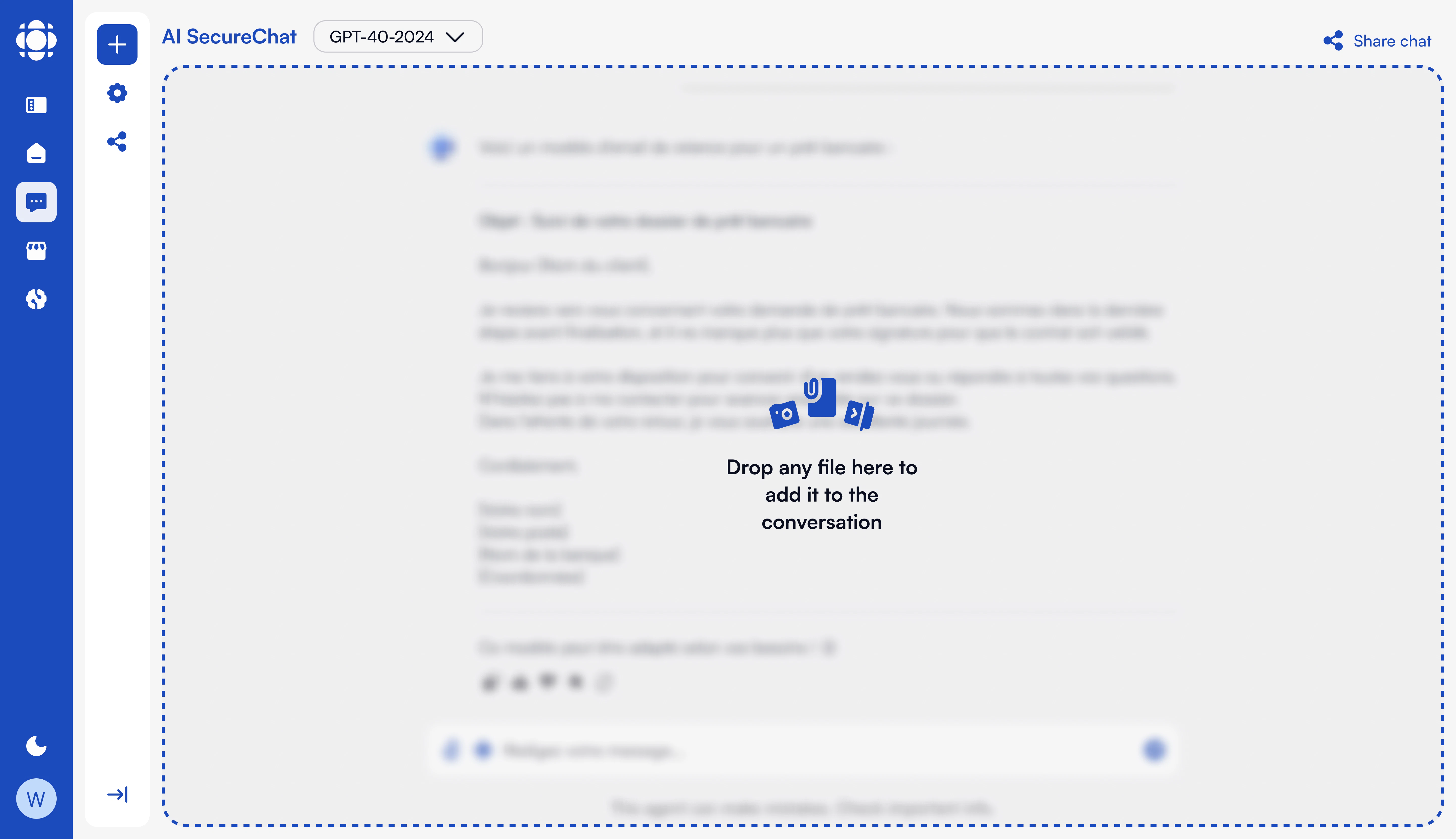
    <Frame>
      <img src="https://mintcdn.com/prismeai-legacy/jdOgS9ouJy0zTcFo/images/document-processing.png?fit=max&auto=format&n=jdOgS9ouJy0zTcFo&q=85&s=209b1991f5a2905db62786584f913494" alt="Document Processing" width="5760" height="3320" data-path="images/document-processing.png" />
    </Frame>

    Key processes include:

    * Text extraction from various file formats
    * Chunking of content into manageable pieces
    * Embedding generation for semantic search
    * Metadata extraction and enrichment
    * Index creation and optimization
  </Step>

  <Step title="Query Processing">
    Transforming user questions into effective retrieval queries.

    Important components:

    * Query understanding and classification
    * Query expansion or reformulation
    * Query embedding generation
    * Metadata filtering and constraints
    * Hybrid search strategy selection
  </Step>

  <Step title="Retrieval">
    Finding the most relevant information from the knowledge base.

    Retrieval approaches include:

    * Semantic search using vector embeddings
    * Keyword search for precise term matching
    * Hybrid search combining multiple strategies
    * Metadata filtering for context-specific results
    * Relevance ranking and reranking
  </Step>

  <Step title="Context Assembly">
    Organizing retrieved information for optimal use by the model.

    Assembly considerations:

    * Context window size limitations
    * Information relevance prioritization
    * Document structure preservation
    * Source attribution maintenance
    * Contextual framing for the model
  </Step>

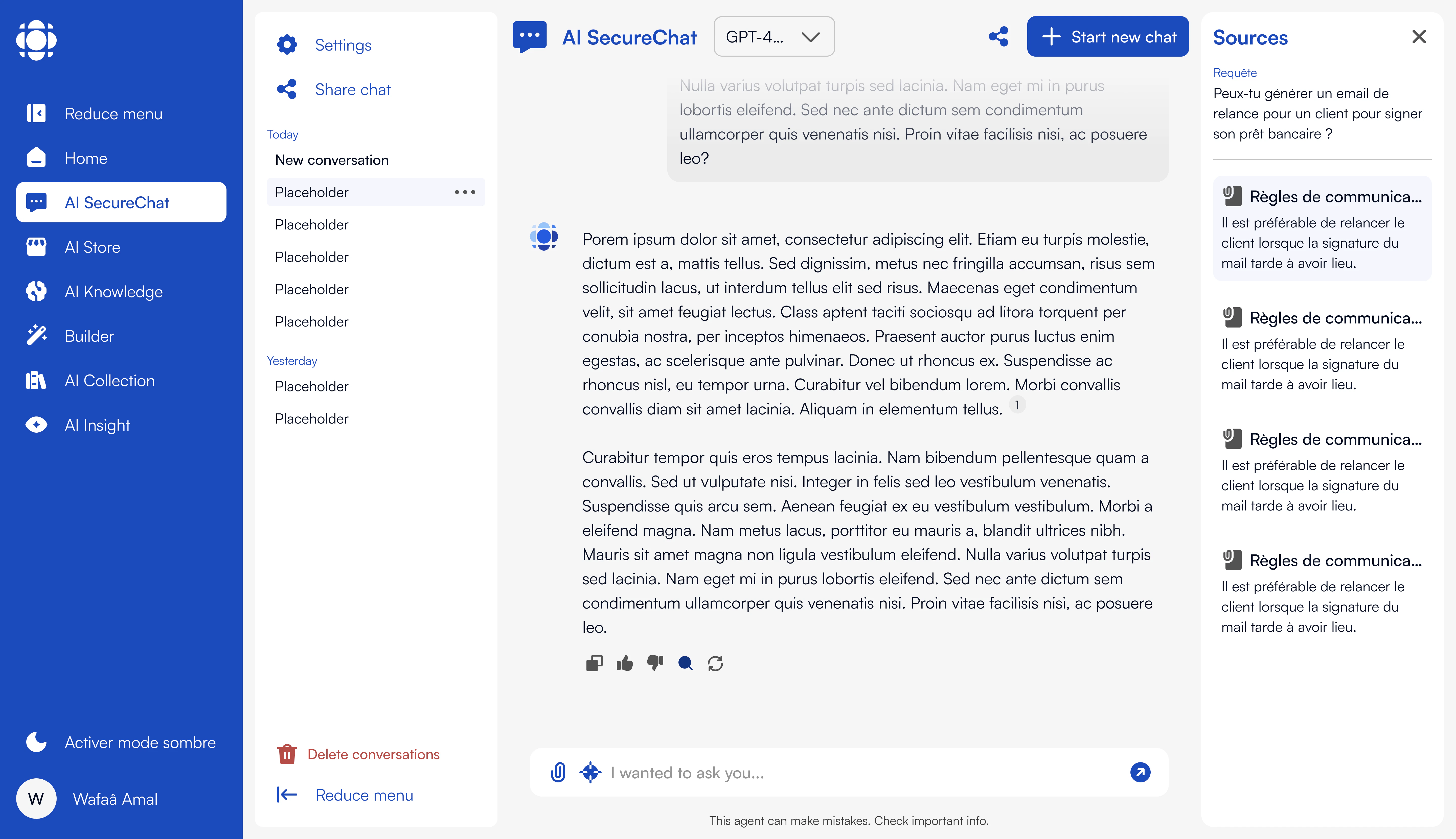
  <Step title="Response Generation">
    Creating answers that incorporate the retrieved information.

    <Frame>
      <img src="https://mintcdn.com/prismeai-legacy/jdOgS9ouJy0zTcFo/images/securechat-nav.png?fit=max&auto=format&n=jdOgS9ouJy0zTcFo&q=85&s=bd903faa63e40cc9d2cf9e7fcfa68262" alt="Response Generation" width="5760" height="3320" data-path="images/securechat-nav.png" />
    </Frame>

    Generation aspects:

    * Integration of retrieved information
    * Citation of sources
    * Handling of conflicting information
    * Management of uncertainty
    * Response formatting and structure
  </Step>
</Steps>

## Example Use Cases

<Tabs>
  <Tab title="Technical Support">
    **Purpose**: Assist users with technical questions based on product documentation

    **Key Features**:

    * Access to technical manuals and documentation
    * Ability to retrieve specific procedures and specifications
    * Troubleshooting guidance based on known issues
    * Source attribution to official documentation
  </Tab>

  <Tab title="Policy Guidance">
    **Purpose**: Provide accurate information about organizational policies and procedures

    **Key Features**:

    * Retrieval from policy handbooks and guidelines
    * Up-to-date information reflecting the latest policy versions
    * Consistent interpretation of rules and procedures
    * Clear citation of specific policy sections
  </Tab>

  <Tab title="Research Assistant">
    **Purpose**: Help analyze and extract insights from research collections

    **Key Features**:

    * Access to research papers and studies
    * Ability to compare findings across multiple sources
    * Citation of relevant research
    * Synthesis of information from multiple documents
  </Tab>

  <Tab title="Knowledge Management">
    **Purpose**: Make organizational knowledge accessible and usable

    **Key Features**:

    * Integration with internal knowledge bases
    * Preservation of institutional expertise
    * Consistent access to distributed information
    * Reduced knowledge silos
  </Tab>
</Tabs>

## Implementation Steps

Creating an effective RAG agent involves several key steps:

<Steps>
  <Step title="Define Knowledge Requirements">
    Identify what information the agent needs access to and how it will be used.

    Key questions to answer:

    * What specific knowledge domains should the agent cover?
    * What document types and sources will be included?
    * How often does the information change or update?
    * What level of detail is required in responses?
    * Are there security or privacy considerations for certain content?
  </Step>

  <Step title="Prepare Knowledge Base">
    Collect, process, and structure the information for effective retrieval.

    Essential activities:

    * Document collection and curation
    * Text extraction and preprocessing
    * Chunking strategy determination
    * Embedding model selection
    * Metadata definition and extraction
    * Index creation and optimization
  </Step>

  <Step title="Configure Retrieval System">
    Set up the mechanisms for finding relevant information.

    Key configurations:

    * Search strategy selection (semantic, keyword, hybrid)
    * Relevance threshold determination
    * Number of results to retrieve
    * Reranking algorithms
    * Metadata filtering rules
  </Step>

  <Step title="Design Context Management">
    Create processes for organizing and using retrieved information.

    Important considerations:

    * Context window management
    * Information prioritization
    * Source attribution approach
    * Handling conflicting information
    * Managing information overload
  </Step>

  <Step title="Develop Prompting Strategy">
    Create effective prompts that guide the model in using retrieved information.

    Strategy elements:

    * Clear instructions for information synthesis
    * Guidance on source citation
    * Handling of information gaps
    * Uncertainty management
    * Response structure and formatting
  </Step>

  <Step title="Test and Refine">
    Validate performance and iteratively improve.

    Testing approaches:

    * Representative query testing
    * Edge case validation
    * Retrieval quality assessment
    * Response accuracy evaluation
    * End-user usability testing
  </Step>
</Steps>

## Best Practices

<Accordion title="Document Processing Optimization">
  The quality of your knowledge base is foundational to RAG performance.

  **Recommendations**:

  * **Effective chunking strategy**: Balance chunk size to capture sufficient context while remaining focused

    ```
    # Example chunking configuration
    {
      "chunk_size": 1000,
      "chunk_overlap": 200
    }
    ```
  * **Quality embedding models**: Use high-dimensional embeddings for better semantic representation
  * **Metadata enrichment**: Add metadata to improve filtering and relevance

    ```
    # Example metadata fields
    {
      "document_type": "policy",
      "department": "finance",
      "effective_date": "2023-09-01",
      "policy_number": "FIN-2023-05",
      "tags": ["managers", "finance_team"]
    }
    ```
  * **Regular updates**: Establish processes for keeping the knowledge base current
</Accordion>

<Accordion title="Retrieval Tuning">
  By using the Builder with custom automation, you can fine-tune the balance between recall (finding all relevant information) and precision (avoiding irrelevant results), which is critical for optimal performance.

  **Recommendations**:

  * **Hybrid search approaches**: Combine semantic and keyword search for better results

    ```
    # Example of hybrid search using Tools 
     
     - Knowledge Client.listDocuments:
          page: 0
          limit: 20
          filters:
            - field: content
              type: textSearch
              value: '{{body.arguments.keywords}}'
          includeContent: true
          provider: crawler
          output: documents
          includeMetadata: true
    ```
  * **Query reformulation**: Generate multiple query versions to improve retrieval

    ```
    # Example query reformulation

      - Knowledge Client.chat-completion:
          messages:
            - role: assistant
              content: 'Given the following user question, generate 3 alternative phrasings that express the same intent. Return the result as a JSON object with a "reformulations" key.'
            - role: user
              content: 'Question: "{{user_question}}"'
          output: reformulations
      - set:
          name: output
          value:
            value: '{{reformulations}}'
            description: 'alternative phrasings of user question'
    ```
  * **Reranking**: Apply secondary ranking to improve result relevance
  * **Context-aware filtering**: Use conversation context to narrow search scope
</Accordion>

<Accordion title="Context Assembly">
  How you organize retrieved information significantly impacts response quality.

  **Recommendations**:

  * **Context format standardization**: Provide retrieved information in a consistent format

    ```
    # Example context format
    DOCUMENT: [Document Title]
    SOURCE: [Source ID or URL]
    DATE: [Publication or Last Updated Date]
    SECTION: [Section Name]
    CONTENT:
    [Retrieved text]

    DOCUMENT: [Next Document Title]
    ...
    ```
  * **Source prioritization**: Place more relevant or authoritative sources earlier in context
  * **Context instructions**: Include explicit instructions for how the model should use the provided information

    ```
    # Example context instructions
    The following information has been retrieved from company documentation. 
    Use this information to answer the user's question. 
    If the information is insufficient, acknowledge the limitations of the provided context.
    Always cite the specific document and section when providing information.
    ```
  * **Context window management**: Be strategic about what fits in limited context windows
</Accordion>

<Accordion title="Response Generation Guidance">
  Clear instructions improve how models use retrieved information.

  **Recommendations**:

  * **Source attribution requirements**: Instruct on when and how to cite sources

    ```
    # Example attribution instruction
    Always cite the specific document name and section when providing information from the retrieved context.
    Use the format: "According to [Document Name], section [Section Name], ..."
    ```
  * **Information synthesis guidance**: Explain how to combine information from multiple sources

    ```
    # Example synthesis instruction
    If multiple sources provide relevant information, synthesize them into a coherent response.
    If sources conflict, acknowledge the discrepancy and clarify which source is more authoritative or recent.
    ```
  * **Handling information gaps**: Provide clear guidance for when retrieved information is insufficient

    ```
    # Example information gap handling
    If the retrieved information doesn't fully answer the user's question:
    1. Provide what information is available
    2. Clearly state what specific aspects cannot be addressed based on the available information
    3. Suggest how the user might find the missing information (e.g., specific documentation to check)
    ```
  * **Uncertainty management**: Establish how to handle varying levels of confidence
</Accordion>

## Common Challenges and Solutions

<table>
  <tbody>
    <tr>
      Retrieval Quality

      System fails to find relevant information

      <td>
        * Improve chunking strategy
        * Implement hybrid search
        * Add query reformulation
        * Use better embedding models
        * Add metadata for filtering
      </td>
    </tr>

    <tr>
      Hallucinations Despite RAG

      Model generates inaccurate information despite retrieval

      <td>
        * Strengthen instructions about using retrieved information
        * Improve relevance of retrieved content
        * Implement fact-checking mechanisms
        * Add explicit source citation requirements
        * Lower temperature settings for generation
      </td>
    </tr>

    <tr>
      Context Window Limitations

      Retrieved information exceeds model's context capacity

      <td>
        * Implement smarter chunking strategies
        * Improve relevance filtering
        * Compress or summarize retrieved content
        * Consider models with larger context windows
      </td>
    </tr>

    <tr>
      Inconsistent Information

      Knowledge base contains conflicting information

      <td>
        * Implement content governance processes
        * Add metadata for content versioning
        * Provide conflict resolution guidelines
        * Prioritize more recent or authoritative sources
        * Acknowledge conflicts in responses
      </td>
    </tr>

    <tr>
      Knowledge Freshness

      Knowledge base becomes outdated

      <td>
        * Implement regular update processes
        * Add timestamp metadata to all content
        * Create content expiration policies
        * Integrate with content management systems
        * Monitor and flag outdated information
      </td>
    </tr>
  </tbody>
</table>

## Advanced RAG Techniques

Once you've mastered basic RAG implementation, consider these advanced techniques:

<Accordion title="Multi-Stage Retrieval">
  Using AI Builder, implement a cascade of retrieval steps to improve both efficiency and accuracy.

  **Example Process**:

  ```
  1. Initial broad retrieval: Use embeddings to find potentially relevant documents
  2. Reranking: Apply more sophisticated models to rerank initial results
  3. Focused retrieval: Perform targeted retrieval on the most promising documents
  4. Final assembly: Combine the most relevant information for the model
  ```

  This approach is particularly effective for large knowledge bases where a single retrieval step may miss important information or retrieve too much irrelevant content.

  ```
    - Knowledge Client.chat-completion:
        messages:
          - role: assistant
            content: |-
                You are an AI assistant tasked with evaluating the relevance of each document to the user's query.
                For each document, assign a relevance score from 1 (not relevant) to 5 (highly relevant), and provide a brief justification for the score.
                Return the results in JSON format, listing the documents in descending order of relevance.
                
                Documents:
                {{retrieved_documents}}

                Expected Output Format:
                {
                  "reranked_documents": [
                    {
                      "document_id": "doc1",
                      "score": 5,
                      "justification": "This document directly addresses the user's query with detailed information."
                    },
                    {
                      "document_id": "doc2",
                      "score": 3,
                      "justification": "This document mentions the topic but lacks specific details."
                    },
                    {
                      "document_id": "doc3",
                      "score": 1,
                      "justification": "This document is unrelated to the user's query."
                    }
                  ]
                }
          - role: user
            content: 'User Query: {{userQuery}}'
        output: reranked_documents
  ```
</Accordion>

<Accordion title="Query Enhancement">
  Improve retrieval by transforming user queries into more effective search queries.

  **Techniques**:

  * **Query expansion**: Add related terms to improve recall

    ```
    Original: "vacation policy"
    Expanded: "vacation policy time off leave holiday absence"
    ```
  * **Hypothetical document embeddings**: Generate embeddings for the ideal documents that would answer the query
  * **Query decomposition**: Break complex queries into sub-queries

    ```
    Original: "What's our policy on remote work expenses for international employees?"
    Decomposed:
    - "remote work policy"
    - "expense reimbursement policy"
    - "international employee policies"
    ```
  * **Conversational context incorporation**: Include relevant previous exchanges
</Accordion>

<Accordion title="Self-Verification and Correction">
  Implement mechanisms for the agent to verify its own responses.

  **Approaches**:

  ```
  1. Generate initial response based on retrieved information
  2. Extract factual claims from the response
  3. Verify each claim against the retrieved information
  4. Correct or qualify statements that aren't fully supported
  5. Regenerate improved response
  ```

  This process can significantly reduce hallucinations and improve accuracy, particularly for complex or nuanced topics.
</Accordion>

<Accordion title="Knowledge Graph Integration">
  With AI Builder, enhance your RAG system by integrating structured knowledge representation powered by Neo4j or a similar graph database.

  **Benefits**:

  * Capture relationships between entities
  * Provide structured context for ambiguous terms
  * Enable reasoning across related concepts
  * Improve query understanding through entity resolution

  Knowledge graphs can complement text retrieval by providing structured information about entities and their relationships, particularly valuable in domains with complex interconnections like product catalogs, organizational structures, or technical systems.
</Accordion>

## Implementation in Prisme.ai

Prisme.ai provides comprehensive support for RAG agent implementation through:

<Tabs>
  <Tab title="AI Knowledge">
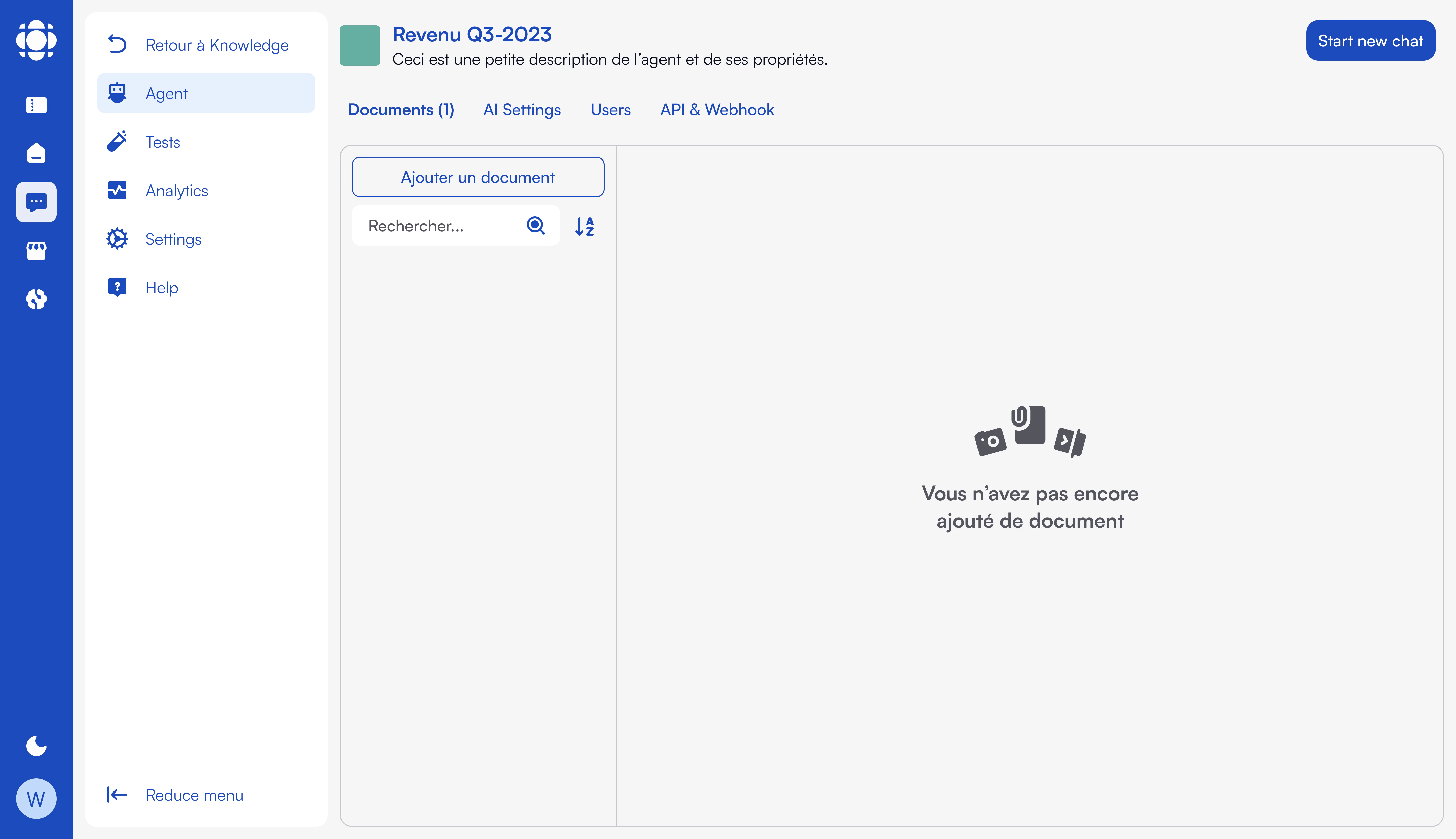
    The AI Knowledge product provides a no-code interface for creating RAG agents:

    <Frame>
      <img src="https://mintcdn.com/prismeai-legacy/jdOgS9ouJy0zTcFo/images/ai-knowledge-nav.png?fit=max&auto=format&n=jdOgS9ouJy0zTcFo&q=85&s=ff92fd330400b39eebecb5d9e39b6acc" alt="AI Knowledge Interface" width="5760" height="3320" data-path="images/ai-knowledge-nav.png" />
    </Frame>

    Key features:

    * Document processing and management
    * Knowledge base creation and organization
    * RAG configuration and optimization
    * Agent creation and deployment
    * Performance analytics and monitoring

    [Learn more about AI Knowledge →](/products/ai-knowledge/overview)
  </Tab>

  <Tab title="AI Builder">
    For advanced customization, **AI Builder** offers multiple options to tailor your solution:

    * **YAML-based Automation**: Natively define and extend event-driven workflows using a declarative YAML configuration for rapid and maintainable orchestration.
    * **Custom Code RAG**: Implement Retrieval-Augmented Generation (RAG) pipelines programmatically using the **Custom Code App**, giving you full control over logic, models, and data flow.
    * **Webhook Integration**: Seamlessly connect with your existing systems via [**Prisme.ai**](http://Prisme.ai)\*\* Webhooks\*\*, enabling real-time interoperability with LangChain, LlamaIndex,  and other enterprise applications.

    <Frame>
      ```
      slug: keyword-search
      name: AIK/Tools/Search Keyword
      do:
        - conditions:
            '{{body.projectId}} != {{config.agentCredentials.projectId}} || !{{run.sourceWorkspaceId}} || {{run.sourceWorkspaceId}} != {{global.workspacesRegistry[''ai-knowledge''].id}}':
              - set:
                  name: output
                  value:
                    error: Forbidden
              - break: {}
        - Knowledge Client.listDocuments:
            page: 0
            limit: 20
            filters:
              - field: content
                type: textSearch
                value: '{{body.arguments.keywords}}'
            includeContent: true
            provider: crawler
            output: documents
            includeMetadata: true
        - set:
            name: output
            value:
              value: '{{documents}}'
              description: 'documents using the keyword search: {{body.arguments.keywords}}'
      validateArguments: true
      arguments:
        body:
          type: object
          properties:
            arguments:
              type: object
              properties:
                keywords:
                  type: string
                  title: keywords
                  placeholder: security
                  description: Extract keywords from the end user's prompt.
      description: Return matching documents as JSON, filtered by keyword search.
      output:
        type: tool_result
        output: '{{output}}'
      when:
        endpoint: true
      labels:
        - tools
      ```
    </Frame>

    Key capabilities:

    * Custom document processing pipelines
    * Advanced retrieval strategies
    * Custom embedding models
    * Sophisticated context assembly
    * Integration with other systems and data sources

    [Learn more about AI Builder →](/products/ai-builder/overview)
  </Tab>
</Tabs>