> ## Documentation Index
> Fetch the complete documentation index at: https://prismeai-legacy.mintlify.site/llms.txt
> Use this file to discover all available pages before exploring further.

# No-Code Agents Overview

> Learn how to create powerful AI agents without writing code using Prisme.ai

Prisme.ai's no-code capabilities empower users across your organization to create sophisticated AI agents without programming experience. This democratizes AI development while maintaining enterprise-grade security, governance, and performance.

## Benefits of No-Code AI Development

<CardGroup cols={3}>
  <Card title="Wider Access" icon="users">
    Empower subject-matter experts to create AI solutions directly
  </Card>

  <Card title="Faster Deployment" icon="rocket">
    Reduce development time from weeks to hours
  </Card>

  <Card title="Reduced Costs" icon="coins">
    Eliminate dependency on specialized AI development resources
  </Card>

  <Card title="Domain Expertise" icon="brain">
    Enable those with business knowledge to shape AI behavior
  </Card>

  <Card title="Experimentation" icon="flask">
    Facilitate rapid prototyping and iteration
  </Card>

  <Card title="Governance" icon="shield-check">
    Maintain control with centralized oversight
  </Card>
</CardGroup>

## No-Code Agent Types

Prisme.ai supports several types of no-code agents, each with distinct capabilities:

<Tabs>
  <Tab title="Simple Prompting Agents">
    Basic agents powered by foundation models with specialized instructions.

    **Key Features:**

    * Custom system instructions
    * Persona definition
    * Response formatting
    * Specialized knowledge embedding

    **Best For:**

    * Question answering
    * Content generation
    * Simple conversational assistants
    * Standard processes with clear instructions

    [Learn more about Simple Prompting Agents →](/create-agents/no-code/simple-prompting-agent)
  </Tab>

  <Tab title="RAG Agents">
    Knowledge-powered agents that access your organization's documents and information.

    **Key Features:**

    * Document processing and ingestion
    * Knowledge base creation
    * Semantic search integration
    * Source citation

    **Best For:**

    * Internal knowledge bases
    * Document-based workflows
    * Policy and procedure guidance
    * Self-service information access

    [Learn more about RAG Agents →](/create-agents/no-code/rag-agent)
  </Tab>

  <Tab title="RAG with Built-in Tools">
    Advanced agents that combine knowledge retrieval with specialized capabilities.

    **Key Features:**

    * Knowledge base integration
    * Pre-configured tool access
    * Task automation
    * Enhanced capabilities beyond conversation

    **Best For:**

    * Advanced customer support
    * Technical documentation with examples
    * Research and analysis
    * Content creation with external information

    [Learn more about RAG with Built-in Tools →](/create-agents/no-code/rag-builtin-tools-agent)
  </Tab>
</Tabs>

## Available Built-in Tools

No-code agents can leverage several built-in tools without any programming:

<CardGroup cols={3}>
  <Card title="Web Browsing" icon="globe">
    Access current information from the internet using Serper integration
  </Card>

  <Card title="Image Generation" icon="image">
    Create images based on text descriptions
  </Card>

  <Card title="Code Interpreter" icon="code">
    Run code to perform calculations, data analysis, and visualizations
  </Card>

  <Card title="PDF Analysis" icon="file-pdf">
    Extract, summarize, and analyze information from PDF documents
  </Card>

  <Card title="Document Generation" icon="file-lines">
    Create formatted documents, reports, and presentations
  </Card>

  <Card title="Data Visualization" icon="chart-line">
    Generate charts and graphs from data
  </Card>
</CardGroup>

## No-Code Development Process

Creating effective no-code agents involves several key steps:

<Steps>
  <Step title="Define Purpose and Requirements">
    Clearly articulate what your agent needs to accomplish.

    Key questions to answer:

    * What specific problem will this agent solve?
    * Who are the intended users?
    * What information does it need access to?
    * What actions should it be able to perform?
    * How will success be measured?
  </Step>

  <Step title="Select Agent Type">
    Choose the appropriate agent architecture based on your needs.

    Selection criteria:

    * Simple Prompting for basic interactions
    * RAG for knowledge-intensive applications
    * RAG with Built-in Tools for enhanced capabilities
  </Step>

  <Step title="Prepare Knowledge Resources">
    Gather and organize the information your agent needs.

    For RAG agents:

    * Collect relevant documents
    * Organize content logically
    * Update outdated information
    * Remove sensitive or irrelevant content
  </Step>

  <Step title="Configure Agent Behavior">
    Define how your agent will interact with users.

    Key configurations:

    * System instructions
    * Response style and format
    * Tool selection and usage criteria
    * Knowledge retrieval settings
  </Step>

  <Step title="Test and Refine">
    Validate performance and iteratively improve.

    Testing approaches:

    * Sample conversations
    * Edge case scenarios
    * User feedback collection
    * Performance monitoring
  </Step>

  <Step title="Deploy and Monitor">
    Make your agent available to users and track its effectiveness.

    Deployment considerations:

    * Access controls
    * Usage monitoring
    * Feedback mechanisms
    * Improvement workflows
  </Step>
</Steps>

## Creating Agents with AI Store

Prisme.ai's AI Store provides a user-friendly interface for creating no-code agents:

### Key Features

<CardGroup cols={2}>
  <Card title="Visual Agent Builder" icon="wand-magic-sparkles">
    Intuitive interface for agent configuration without coding
  </Card>

  <Card title="Template Library" icon="copy">
    Pre-built templates for common use cases
  </Card>

  <Card title="Knowledge Integration" icon="database">
    Direct connection to organizational knowledge bases
  </Card>

  <Card title="Tool Configuration" icon="screwdriver-wrench">
    Simple setup for built-in tool access
  </Card>

  <Card title="Testing Environment" icon="vial">
    Dedicated space to validate agent performance
  </Card>

  <Card title="Versioning" icon="code-branch">
    Track changes and manage agent versions
  </Card>
</CardGroup>

### AI Store Workflow

<Steps>
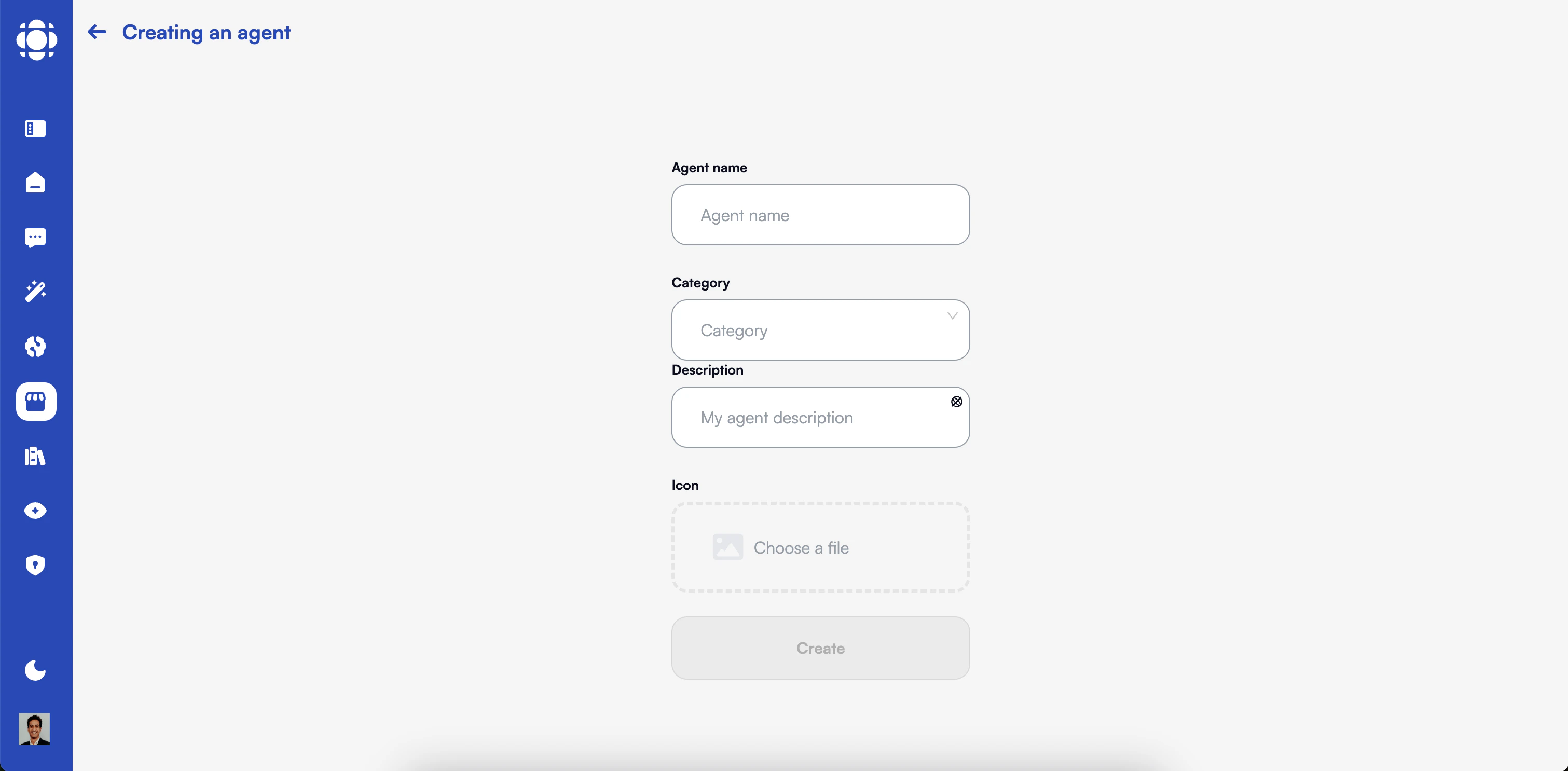
  <Step title="Create New Agent">
    Start with a blank slate or select from templates.

    <Frame>
      <img src="https://mintcdn.com/prismeai-legacy/jdOgS9ouJy0zTcFo/images/agent-creation.png?fit=max&auto=format&n=jdOgS9ouJy0zTcFo&q=85&s=9a78cce929e122a8c22596aa6300f1c7" alt="Create New Agent" width="3022" height="1486" data-path="images/agent-creation.png" />
    </Frame>

    Options include:

    * Blank agent
    * Industry-specific templates
    * Function-based templates
    * Duplicating existing agents
  </Step>

  <Step title="Define Basic Information">
    Set the agent's identity and purpose.

    Key information:

    * Agent name
    * Description
    * Category/tags
    * Access permissions
  </Step>

  <Step title="Configure Capabilities">
    Select and customize the agent's features.

    Available options:

    * Foundation model selection
    * Knowledge base connections
    * Built-in tool activation
    * Response parameters
  </Step>

  <Step title="Set System Instructions">
    Define the agent's behavior through prompting.

    Instruction components:

    * Role definition
    * Response guidelines
    * Knowledge utilization
    * Tool usage criteria
    * Limitations and constraints
  </Step>

  <Step title="Test and Preview">
    Validate agent performance in the testing environment.

    Testing capabilities:

    * Interactive conversation
    * Sample queries
    * Tool execution preview
    * Knowledge retrieval verification
  </Step>

  <Step title="Publish and Share">
    Make the agent available to intended users.

    Sharing options:

    * Organization-wide publication
    * Team-specific access
    * Individual user permissions
    * External link sharing (if permitted)
  </Step>
</Steps>

## Best Practices for No-Code Agents

<Accordion title="Start Simple, Then Expand">
  Begin with basic functionality and add complexity incrementally.

  **Approach:**

  * Create a minimal viable agent first
  * Test core functionality thoroughly
  * Add additional capabilities one at a time
  * Validate each new feature before moving on

  This iterative approach helps identify issues early and ensures a solid foundation.
</Accordion>

<Accordion title="Craft Clear Instructions">
  The quality of your system instructions directly impacts agent performance.

  **Guidelines:**

  * Be specific about the agent's role and purpose
  * Provide examples of ideal responses
  * Include formatting requirements
  * Define boundaries and limitations clearly
  * Use simple, unambiguous language

  Well-crafted instructions create consistent, predictable agent behavior and reduce the need for frequent refinements.
</Accordion>

<Accordion title="Optimize Knowledge Organization">
  How you structure your knowledge bases affects retrieval quality.

  **Best practices:**

  * Organize documents logically by topic
  * Use clear, descriptive document titles
  * Break large documents into meaningful chunks
  * Include relevant metadata for filtering
  * Remove duplicate or outdated content

  Strategic knowledge organization improves response accuracy and relevance.
</Accordion>

<Accordion title="Test with Real Scenarios">
  Validate your agent with authentic use cases and edge cases.

  **Testing approach:**

  * Create a diverse set of test questions
  * Include common queries and edge cases
  * Test with different phrasings of similar questions
  * Incorporate actual user language and terminology
  * Validate tool usage with realistic scenarios

  Thorough testing identifies gaps and ensures the agent can handle real-world interactions.
</Accordion>

<Accordion title="Collect and Incorporate Feedback">
  Establish a systematic process for gathering and implementing user input.

  **Feedback system:**

  * Enable easy feedback submission within the agent interface
  * Review feedback regularly
  * Identify patterns in user satisfaction and pain points
  * Prioritize improvements based on impact
  * Close the feedback loop by informing users of changes

  Continuous improvement based on user feedback ensures the agent remains valuable over time.
</Accordion>

## Common Challenges and Solutions

<table>
  <thead>
    <tr>
      <th>Challenge</th>
      <th>Description</th>
      <th>Solution</th>
    </tr>
  </thead>

  <tbody>
    <tr>
      <td>Inconsistent Responses</td>
      <td>Agent provides varying answers to similar questions</td>

      <td>
        * Refine system instructions with more specific guidance<br />
        * Add example responses for common scenarios<br />
        * Lower the temperature setting for more predictability<br />
        * Create response templates for key question types
      </td>
    </tr>

    <tr>
      <td>Poor Knowledge Retrieval</td>
      <td>Agent fails to find or use relevant information</td>

      <td>
        * Improve document chunking strategy<br />
        * Enhance metadata for better filtering<br />
        * Adjust retrieval settings (more results, higher relevance threshold)<br />
        * Reorganize knowledge base structure<br />
        * Add query reformulation instructions
      </td>
    </tr>

    <tr>
      <td>Inappropriate Tool Usage</td>
      <td>Agent uses tools unnecessarily or incorrectly</td>

      <td>
        * Provide explicit criteria for when to use each tool<br />
        * Include examples of appropriate tool usage<br />
        * Add constraints for tool selection<br />
        * Create step-by-step instructions for complex tools<br />
        * Test with diverse scenarios to verify behavior
      </td>
    </tr>

    <tr>
      <td>Scope Confusion</td>
      <td>Agent struggles with determining boundaries of its role</td>

      <td>
        * Define clear in-scope and out-of-scope topics<br />
        * Provide explicit handling instructions for edge cases<br />
        * Include examples of appropriate redirects or escalations<br />
        * Create specific guidance for handling ambiguous requests<br />
        * Test boundary conditions regularly
      </td>
    </tr>

    <tr>
      <td>User Adoption Resistance</td>
      <td>End users hesitant to engage with AI agents</td>

      <td>
        * Create a transparent introduction explaining the agent's purpose and limitations<br />
        * Provide clear examples of how the agent can help<br />
        * Establish easy escalation to human support when needed<br />
        * Collect and address feedback proactively<br />
        * Show concrete value through time savings or improved information access
      </td>
    </tr>
  </tbody>
</table>

## Enterprise Governance Considerations

<CardGroup cols={2}>
  <Card title="Access Control" icon="lock">
    Implement appropriate permissions for agent creation and usage

    **Key practices:**

    * Role-based access for agent creation
    * Approval workflows for production deployment
    * User group definitions for agent access
    * Audit logs for agent modifications
  </Card>

  <Card title="Content Compliance" icon="gavel">
    Ensure agents adhere to organizational policies

    **Key practices:**

    * Pre-deployment review process
    * Compliance checklist verification
    * Sensitive information handling guidelines
    * Regular content audits
  </Card>

  <Card title="Performance Monitoring" icon="gauge-high">
    Track agent effectiveness and usage

    **Key practices:**

    * Usage metrics dashboard
    * User satisfaction tracking
    * Response quality evaluation
    * System performance monitoring
  </Card>

  <Card title="Information Security" icon="shield-halved">
    Protect sensitive data in agent interactions

    **Key practices:**

    * Data handling guidelines
    * PII protection measures
    * Conversation logging policies
    * Retention and purging schedules
  </Card>
</CardGroup>

## Next Steps

Ready to create your first no-code agent? Explore these resources:

<CardGroup cols={2}>
  <Card title="Simple Prompting Agent" icon="message" href="/create-agents/no-code/simple-prompting-agent">
    Create basic agents with custom instructions
  </Card>

  <Card title="RAG Agent" icon="book-open" href="/create-agents/no-code/rag-agent">
    Build knowledge-powered agents
  </Card>

  <Card title="RAG with Built-in Tools" icon="toolbox" href="/create-agents/no-code/rag-builtin-tools-agent">
    Develop advanced agents with enhanced capabilities
  </Card>

  <Card title="AI Store Guide" icon="store" href="/products/ai-store/creating-agents">
    Learn more about the AI Store platform
  </Card>
</CardGroup>
